"optimized pallet"

Homepage: www.mtm2.com/~traxx/index.shtml
Post Reply
User avatar
white2098
Member
Posts: 496
Joined: Sun Nov 03, 2002 2:01 pm
Location: carmel, california, usa

"optimized pallet"

Post by white2098 »

sorry for all the questions, but i had a question about the optimized pallet feature in traxx. the last times i did it on a track it made it so the trucks you drove on the tracks were off in color.

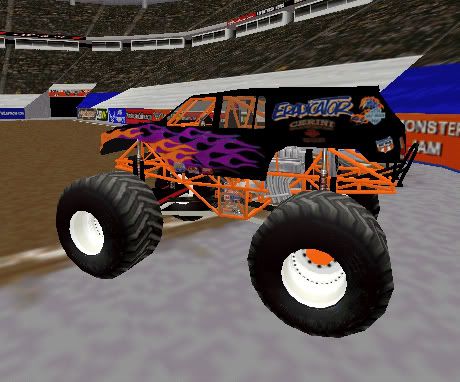
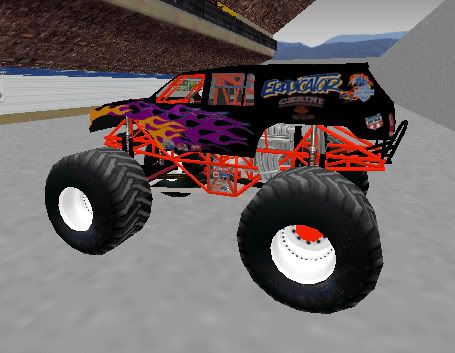
here's an example of a track without the custom pallet vs. my rca dome with a custom pallet.

Image
Image

notice how much the color of the truck is affected?

is it possible to use the optimized pallet without sacrificing the look of the trucks in game.
User avatar
Kmaster
MTM2 Engineer
Posts: 1370
Joined: Fri Oct 10, 2003 6:19 pm
Location: Valparaíso, Chile.
Contact:

Post by Kmaster »

Yep, a custom track pallette affects the whole game objects, including the trucks.

>is it possible to use the optimized pallet without sacrificing the look of the trucks in game.
I don't think that's possible. :/
User avatar
Slayer
Member
Posts: 1822
Joined: Sun Oct 16, 2005 4:39 pm
Location: Winnipeg Manitoba, Canada

Post by Slayer »

didnt smomeone once say make a set of tiles off somewhere that u dotn care about on the track, one of each colour that u want preserved, so when u make custom pallete, they are entered. otherwise, if there is no orange on yoru track for example, than orange trucks get buggered up.
Image
User avatar
white2098
Member
Posts: 496
Joined: Sun Nov 03, 2002 2:01 pm
Location: carmel, california, usa

Post by white2098 »

actually i have that on rca dome outside of the arena model. it's a pallet with every color on it, but it didn't work unfortunately.
User avatar
Phineus
Glow Ball
Posts: 24
Joined: Tue Feb 02, 1999 7:00 pm

Post by Phineus »

That's the trick to use. But its effectiveness varies with the texture in question. I find that if you use the stock bigfoot texture, and a few other choice truck textures then you can get acceptable results.

Another option is to save the palette from the track you know works the way you want it, then load it in the new track... and cross your fingers everything else will still look all right. Easy enough to switch back if you're not happy with the result.

User avatar
Slayer
Member
Posts: 1822
Joined: Sun Oct 16, 2005 4:39 pm
Location: Winnipeg Manitoba, Canada

Post by Slayer »

You mean I was right for once??? wow lol
Image
User avatar
Kmaster
MTM2 Engineer
Posts: 1370
Joined: Fri Oct 10, 2003 6:19 pm
Location: Valparaíso, Chile.
Contact:

Post by Kmaster »

Slayer wrote:You mean I was right for once??? wow lol
wtg [:-)] lol
Post Reply