MilkShape 3D OBJ files

Homepage: http://www.mtm2.com/BinEdit/
Post Reply
User avatar
Kmaster
MTM2 Engineer
Posts: 1371
Joined: Fri Oct 10, 2003 6:19 pm
Location: Valparaíso, Chile.
Contact:

MilkShape 3D OBJ files

Post by Kmaster »

I'm using MilkShape 3D 1.1.0 Beta to create cool 3d models of buildings for a new city track but BinEdit crashes when I try to import this OBJ file

http://jpkmaster.googlepages.com/BOX3.OBJ

BinEdit version 2.2

---------

I have asked Phin & Mal

Phineus wrote :

>As far as I know, there is more than one OBJ file format and the one you have is not supported by binedit. The trick would be to see if there are other export/save options in milkshape.

Malibu350 wrote :

>Milkshape creates obj's with texture coordinates that binedit cannot read. Binedit will only import obj's and 3ds's with no texture coordinates. sorry

Also, phin wrote :

>This would be a good question to post in the forum.

So, any more ideas, resp or something? (Thanks Phin, Mal for your help)
User avatar
white2098
Member
Posts: 496
Joined: Sun Nov 03, 2002 2:01 pm
Location: carmel, california, usa

Post by white2098 »

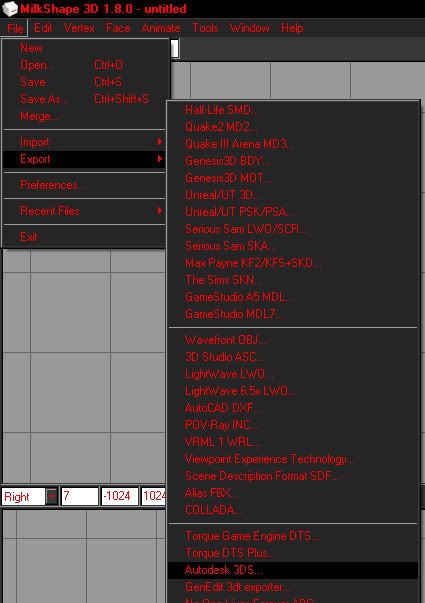
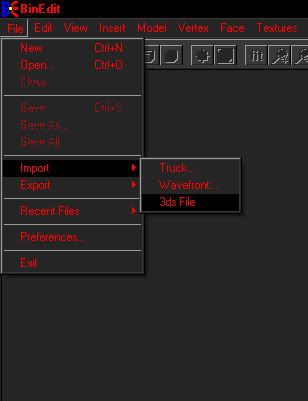
you need to export the files as "autodesk 3DS" files. then in binedit, import the "3DS" file. make sure you have a texture ready because binedit will ask you for a texture to load with the model.
User avatar
white2098
Member
Posts: 496
Joined: Sun Nov 03, 2002 2:01 pm
Location: carmel, california, usa

Post by white2098 »

Image
Image
User avatar
Kmaster
MTM2 Engineer
Posts: 1371
Joined: Fri Oct 10, 2003 6:19 pm
Location: Valparaíso, Chile.
Contact:

Post by Kmaster »

white2098 wrote:you need to export the files as "autodesk 3DS" files. then in binedit, import the "3DS" file. make sure you have a texture ready because binedit will ask you for a texture to load with the model.
didnt work. but now, binedit gave me a "debug assertion error" stuff instead of a that ulgy "page fault error". This is the only file that i'm having problems. the others OBJ files created w/ milkshape works fine.
User avatar
white2098
Member
Posts: 496
Joined: Sun Nov 03, 2002 2:01 pm
Location: carmel, california, usa

Post by white2098 »

if you have textures mapped to the model in milkshape, that could be the problem.

you need to export the file with no textures on it and make sure it's an "autodesk 3ds" file.
User avatar
Kmaster
MTM2 Engineer
Posts: 1371
Joined: Fri Oct 10, 2003 6:19 pm
Location: Valparaíso, Chile.
Contact:

Post by Kmaster »

>if you have textures mapped to the model in milkshape, that could be the problem.

No mapped textures.

>you need to export the file with no textures on it and make sure it's an "autodesk 3ds" file.

Done. Same error. Looks like this problem has no solution.
Post Reply