Having a problem with a model

Downloads: www.mtm2.com/MTM2/Trucks/trucks.php
Post Reply
N_Gage_18
Member
Posts: 498
Joined: Wed May 14, 2008 7:20 am
Location: Behind you

Having a problem with a model

Post by N_Gage_18 »

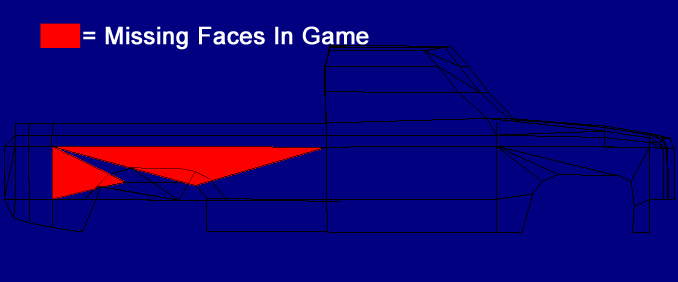
Alright, I'm working on another new truck and I've run into a problem. I've got all the model work done and I loaded it in game to test it out and two of the faces on the right (passenger) bedside are missing in-game. I took a picture of the wireframe in Bin-Edit and Highlighted the missing faces in red. The red areas are two ditterent faces. The other lines inside them are from other faces.
Image
I was wanting to know if there was any way to fix it without having to re-do the model (Rep-Fan's 1988 Cheyenne, by the way)

P.S. I'm having the same problem with the Problem Child truck though there is another face missing on the other side as well.

Admin of the MTM2 Draggers facebook page, find it here!
https://m.facebook.com/groups/337032006 ... =bookmarks

Nat Gage (She/They, pls)
I used to be PM Customs but now I'm taking meds for that ;)
User avatar
Phineus
Glow Ball
Posts: 24
Joined: Tue Feb 02, 1999 7:00 pm

Post by Phineus »

I've seen this too, though I haven't found an answer yet. In cases I've come across, I was able to re-extract the model and use a texture replacer to re-apply the texture. It worked but I don't know if I wasn't just lucky.
User avatar
Rep Fan
You Gonna Eat That?
Posts: 923
Joined: Tue Mar 27, 2001 2:01 pm
Location: Nebraska
Contact:

Post by Rep Fan »

Did you accidentally "flip" the face? It prolly shows up on the model, cuz its there, just facing the wrong way. Just highlight the area in BE, if its highlight-able, the face is still there, just flip it back. If it cant be highlighted, its gone.

The only other explanation is that it got deleted.

If thats the case, just re-extract the body model from the pod.
Post Reply