MTM2 Community Patch #1

mtm2 and other sensible chat
User avatar
Fila
Member
Posts: 1453
Joined: Mon Jul 02, 2001 2:01 pm
Location: Lost in Translation
Contact:

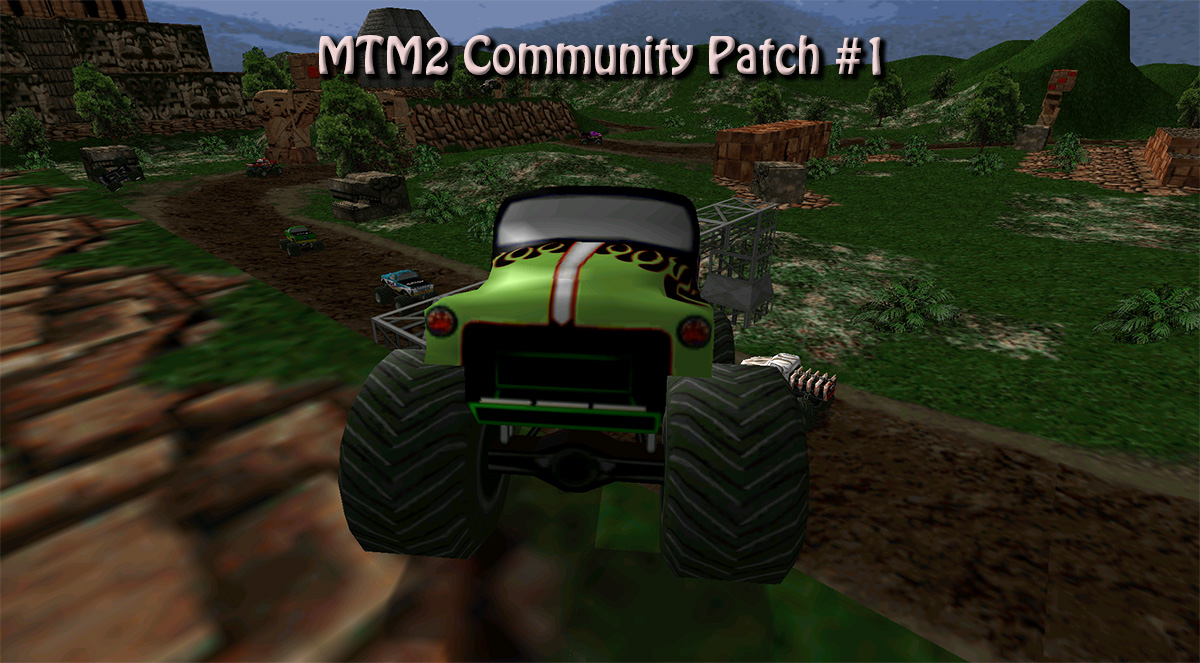
MTM2 Community Patch #1

Post by Fila »

Image

Here it is finally, the first Community Patch.

Before we go ahead and go into descriptions of what to expect please remember the most important thing:

This patch is provided as is. TRI and Microsoft have nothing to do with it and will offer no support. If it doesn't work please post in here but my knowledge of troubleshooting problems is limited. And please BACK UP YOUR ORIGINAL FILES!!!! I can't stress this enough

Changes from MTM2 2.0.42

- version number changed to 2.0.44 (multiplayer is compatible with people using the original version, 2.0.42)
- Increased visual distance from max 20 units to max 50 units.
- Visual distance is fully controllable from within the game.
- Increased maximum verts limit (less crashes)
- Maximum number of objects limit increased (stops tracks from crashing with the new visual distance)
- Box count has been increased - groundbroxes shouldn't crash the game anymore.
- Added a multitude of more modern resolutions.
- Added new UI to go with the new resolutions
- Video clips are working again (for those of you who it didn't work for anymore)
- All 4 truck tires leave track marks
- Tire track life span increased
- Game should not crash if somehow wrong resolutions are selected (the resolution doesn't match the prefereddisplay in monster.ini). If resolution doesn't match it defaults to 640x480.
- Added a BLIMP button in graphics option. Now you have full control of whether you want the blimp to appear or not (can help stop certain tracks from crashing)

HOW TO CORRECTLY USE THE PATCH

- After every resolution change YOU MUST quit the game and restart it. Otherwise the game either won't work or will work very weirdly. (for Windows 10 the game might linger for a few seconds in taskbar under background process. Either manually use End Task or wait for it to go away)
- The 3dfx compatible resolutions (for those using nGlide) are clearly labeled with 3dFX. Do NOT attempt to try a different resolution, the game will crash. If you want to use 3dFX wide screen please select 856x480 and in nGlide 1.05 (mandatory 1.05) use the "fit to screen" option.
- fixmore.pod is still needed!
- If in Windows 10 the game refuses to go into full screen using Direct3D when using compatible resolutions (like 1920x1080 for example) try to run the game in compatibility mode using Windows XP SP2. I've had this issue and running with compatibility mode fixed it.
- This only works starting with Windows XP Service Pack 3 and later.

Known Issues

As mentioned, this is provided as is and while effort has been taken to try and get it working crash free, my knowledge of coding is at a beginner level, I am learning as I am going along.

- Dashboard doesn't work. If you want to use first person view please use non-dashboard camera.
- Software Renderer resolutions are unreliable. While most of them work there are specific tracks where it randomly decides to crash. Decreasing visual distance fixes the problem.
- Track appears as completely black in Driver's CheckIn when you start the game. After a race it will display correctly.
- Once you go above 1600x900, the checkpoint finder is a bit messy. It's still functional but ugly.
- Instant Replay page has a weird bug with one of the buttons. If the grey box covers the other buttons then it stops you from being able to click on them. Sometimes a few reloads of the instant replay page is needed. The button itself works even if it looks like a grey square.
- The joystick calibration has an extra green line to the left. Does not affect usability in any way.
- 1536x864 - DO NOT WORK IN FULL SCREEN DIRECT3D!!! I'm starting to believe this might be a DirectX limitation based on the game behavior (game refuses to maximize even when only in the menus) hence there is nothing I can do about it.
- 1440x900 does not work on Windows 10. Works fine on XP SP3, Win 7 and Win 8.1
- EDIT: For the above comment, 1440x900 seems to be working for some people.
- Multiplayer latency isn't calculated in the lobby (bar shows up empty or 0ms) but the game otherwise works correctly.

What to expect in the future

- Increase visual distance.
- Increase in the object limitations (models, textures etc)
- Fix multiplayer latency display
- Fix black truck in driver's checkin.
- Fix checkpoint marker - this might need to be replaced so I will have to look into doing that.
- A fix to remove the menu bar during gameplay in Windows8/10.
- remove the 99 pod limit
-

Long Term Plans - these will take forever to do as it requires a more advanced coding knowledge but ultimately I want it done

- Port the game to DirectX9 to fix many of the compatibility issues/crashes and allow even higher resolutions (2560x1440 etc)
- Port the game to OpenGL - same reason.
- Re-introduce Drag system from MTM1
- extra options in the .trk file, namely a second set of axle bars and different front and rear tires.
- make it read more than the first 8 letters of a sit file name to be the tracks ID
- accepts Axis Z for controllers? (this one will be looked at only after game is finally ported to DX9)
- Incorporating an ingame FPS limiter (not quite Vsync but rather a manual box where you can the maximum limit to whatever you want)
- Decoupling the physics from the FPS count. Right now the game physics (and AI behaviour) is dependent on the frames per second count. This means, the higher the FPS the more different the game behaves. Ideally physics will work the same whether it's 20fps or 100fps.

Low Priority fixes - I don't consider these essential so they will be fixed whenever, could be tomorrow could be in 5 years

- dashboard
- instant replay page
- extra green line at the joystick calibration screen

Download links

http://www.mtm2.com/MTM2/Utilities/Comm ... Patch1.rar (rar file - 80mb)
http://www.mtm2.com/MTM2/Utilities/Comm ... Patch1.zip (zip file - 93mb)

MTM2 Community Patch webpage

Credits

Thanks to Cale for supplying the bulk of the pictures used in the patch.
Thanks to Gamer121 for supplying HD artwork used in the patch.
User avatar
Fila
Member
Posts: 1453
Joined: Mon Jul 02, 2001 2:01 pm
Location: Lost in Translation
Contact:

Re: MTM2 Community Patch #1

Post by Fila »

As always, if you guys have any issues and or any sort of comments please post here. Likewise if you have any requests feel free to come forward, just don't expect instant results :)

Cale: Since I've never touched the truck making aspect of the game, what exactly does your request mean when you say "different front and rear tires". As in... do you want to be able to use a different style of tires (different model)? The game forces you to use the same model for front and back?
User avatar
Cale
Member
Posts: 639
Joined: Mon Oct 27, 2003 7:28 pm

Re: MTM2 Community Patch #1

Post by Cale »

Exactly. The trucks have 6 tire models associated with them - 8, 10, and 16 poly-around left side tires, and the same for the right side tires. The game reads the base model name (say, "xxxxxx" in the .TRK and then looks for "xxxxxx08L.bin" "xxxxxx10L.bin" "xxxxxx16L.bin" models for the left side and "xxxxxx08R.bin" "xxxxxx10R.bin" "xxxxxx16RL.bin".

This may well be a bridge too far for the game engine, since you'd need 12 models total for different front and back, unless the lower poly models could be dropped since there's no real performance limitations anymore.
User avatar
Fila
Member
Posts: 1453
Joined: Mon Jul 02, 2001 2:01 pm
Location: Lost in Translation
Contact:

Re: MTM2 Community Patch #1

Post by Fila »

I'll look into it and see. Yeah the poly count doesn't seem to be the problem with the game, rather the number of 256x256 textures.
bconley
Member
Posts: 15
Joined: Tue Jul 27, 2010 9:32 pm

Re: MTM2 Community Patch #1

Post by bconley »

Image

Just superb. One thing though - 1440X900 works just fine for me. I'm using Direct3D, full screen, no problems. I'm still using Windows XP.
User avatar
Fila
Member
Posts: 1453
Joined: Mon Jul 02, 2001 2:01 pm
Location: Lost in Translation
Contact:

Re: MTM2 Community Patch #1

Post by Fila »

Can't get it to work in 1440x900. Happy it works for you :)
miniz1994
Member
Posts: 7
Joined: Tue Nov 24, 2015 11:27 am

Re: MTM2 Community Patch #1

Post by miniz1994 »

Just tried this patch & i did a strange glitch with it.
I randomly tried demo mode in direct 3d & ofc got the error for being too demanding with the custom trucks (pressed the button again a bunch but nothing happened to open a demo race.)

As i then configured a normal race it made a replay with the exact trucks & track i had.
(Demo press any key to exit) in the left corner.

This happened while in 1366x768 direct 3d as mentioned earlier.
User avatar
Fila
Member
Posts: 1453
Joined: Mon Jul 02, 2001 2:01 pm
Location: Lost in Translation
Contact:

Re: MTM2 Community Patch #1

Post by Fila »

There is no such error "too demanding". If it gives an AV (which is a TRI induced crash) then most of the time it also gives a specific reason why it happens. If I know the specific reason it's easier for me to help.

Anyway, I tried replicating and after several tries the demo tried a raintrack and the "too many headlights" AV happened. Will increase the limits for that.

Edit: If you were running custom trucks it might also be a too many vertices AV error. (which has been increased for beta 0.35). It also displayed the same behavior of the game being stuck in demo mode. It's a funny bug :D Can be replicated in the original game too just that it's less likely for it to happen. Basically it happens every time you receive an AV in demo mode.
miniz1994
Member
Posts: 7
Joined: Tue Nov 24, 2015 11:27 am

Re: MTM2 Community Patch #1

Post by miniz1994 »

Fila wrote:There is no such error "too demanding". If it gives an AV (which is a TRI induced crash) then most of the time it also gives a specific reason why it happens. If I know the specific reason it's easier for me to help.

Anyway, I tried replicating and after several tries the demo tried a raintrack and the "too many headlights" AV happened. Will increase the limits for that.

Edit: If you were running custom trucks it might also be a too many vertices AV error. (which has been increased for beta 0.35). It also displayed the same behavior of the game being stuck in demo mode. It's a funny bug :D Can be replicated in the original game too just that it's less likely for it to happen. Basically it happens every time you receive an AV in demo mode.
Yeah didn't pay attention really too what the error was heh was keen on trying out the patch & how it looked ^^.
Was quite fun to mess about with the replay glitch though.

Bit confusing at first pressing the up arrow & ending up at the race won screen while it hadn't even let the trucks start rolling yet lol.

I did install a new retail version of mtm 2 with fixmore4.pod & the current patch here & it works fine in 1080p on all tracks with all settings on c:
Gonna give it a go on the laptop tomorrow with this patch & the native res of the laptop 1366x768.

Forcing on 16x aniostrophic filtering & high texture quality makes the stock trucks pretty good looking at 1080p.
antialiasing is still causing some render glitches like 3dfx does on my amd r9 280 heh.
User avatar
Fila
Member
Posts: 1453
Joined: Mon Jul 02, 2001 2:01 pm
Location: Lost in Translation
Contact:

Re: MTM2 Community Patch #1

Post by Fila »

Yeah I can't force anti-aliasing on nvidia either. The best I can do is FXAA.
User avatar
METH
Member
Posts: 115
Joined: Thu Jun 12, 2003 4:58 pm
Location: USA

Re: MTM2 Community Patch #1

Post by METH »

Only problem I have is when I start the game and go to Driver Check In, the trucks are all black. After I run a race and go back then they have there paint.

Settings:
1920 x 1080
Direct 3D
All Complex
TEAM XTREME
------XFA-----
Team Captain
User avatar
Fila
Member
Posts: 1453
Joined: Mon Jul 02, 2001 2:01 pm
Location: Lost in Translation
Contact:

Re: MTM2 Community Patch #1

Post by Fila »

Yeah it seems that for some reason it's not initializing something, I haven't figured out what exactly yet because trucks like Monster Patrol for example, the additional objects like the big object on its back gets rendered correctly.
bconley
Member
Posts: 15
Joined: Tue Jul 27, 2010 9:32 pm

Re: MTM2 Community Patch #1

Post by bconley »

Here's a little thing for you - whenever you try to load Dark Star for MTM2 immediately after a track with a dark background the game crashes. This is an old bug from the retail version of the game too. It's not particularly important but here's the error code if you want to look into it.

Code: 0xc0000005 Flags:0x00000000 Record: 0x000000000000000 Address: 0x0000000000815d4e

<?xml version="1.0" encoding="UTF-16"?>
<DATABASE>
<EXE NAME="monster.exe" FILTER="GRABMI_FILTER_PRIVACY">
<MATCHING_FILE NAME="C-POD.exe" SIZE="724992" CHECKSUM="0xDBCC0CDC" BIN_FILE_VERSION="1.0.0.57" BIN_PRODUCT_VERSION="1.0.0.57" PRODUCT_VERSION="1.00.0057" FILE_DESCRIPTION="C-POD by CH_2005 e-mail: ch_2005@programmer.net April 2002" COMPANY_NAME="CH_2005" PRODUCT_NAME="C-POD" FILE_VERSION="1.00.0057" ORIGINAL_FILENAME="C-POD57.exe" INTERNAL_NAME="C-POD57" LEGAL_COPYRIGHT="C-POD by CH_2005 e-mail: ch_2005@programmer.net April 2002" VERFILEDATEHI="0x0" VERFILEDATELO="0x0" VERFILEOS="0x4" VERFILETYPE="0x1" MODULE_TYPE="WIN32" PE_CHECKSUM="0xB6139" LINKER_VERSION="0x10000" UPTO_BIN_FILE_VERSION="1.0.0.57" UPTO_BIN_PRODUCT_VERSION="1.0.0.57" LINK_DATE="05/27/2005 03:37:07" UPTO_LINK_DATE="05/27/2005 03:37:07" VER_LANGUAGE="English (United States) [0x409]" />
<MATCHING_FILE NAME="Cowpod.exe" SIZE="266240" CHECKSUM="0x498AFAAC" BIN_FILE_VERSION="1.0.0.0" BIN_PRODUCT_VERSION="1.0.0.0" PRODUCT_VERSION="1.00" FILE_DESCRIPTION="A program for Monster Truck Madness 2" COMPANY_NAME="MTMG" PRODUCT_NAME="Cowpod" FILE_VERSION="1.00" ORIGINAL_FILENAME="Cowpod.exe" INTERNAL_NAME="Cowpod" LEGAL_COPYRIGHT="2005" VERFILEDATEHI="0x0" VERFILEDATELO="0x0" VERFILEOS="0x4" VERFILETYPE="0x1" MODULE_TYPE="WIN32" PE_CHECKSUM="0x4A61C" LINKER_VERSION="0x10000" UPTO_BIN_FILE_VERSION="1.0.0.0" UPTO_BIN_PRODUCT_VERSION="1.0.0.0" LINK_DATE="05/17/2005 15:33:40" UPTO_LINK_DATE="05/17/2005 15:33:40" VER_LANGUAGE="English (United States) [0x409]" />
<MATCHING_FILE NAME="glide.dll" SIZE="229376" CHECKSUM="0xFC62EEDC" BIN_FILE_VERSION="2.11.0.0" BIN_PRODUCT_VERSION="1.50.2.0" PRODUCT_VERSION="1, 50, 2, 0" FILE_DESCRIPTION="dgVoodoo Glide wrapper (for Glide v2.11)" COMPANY_NAME="SuckSoftware" PRODUCT_NAME="dgVoodoo v1.50 Beta2" FILE_VERSION="2, 11, 0, 0" ORIGINAL_FILENAME="Glide.dll" INTERNAL_NAME="Glide" LEGAL_COPYRIGHT="by Dégé, Copyright ©2007" VERFILEDATEHI="0x0" VERFILEDATELO="0x0" VERFILEOS="0x4" VERFILETYPE="0x2" MODULE_TYPE="WIN32" PE_CHECKSUM="0x0" LINKER_VERSION="0x0" UPTO_BIN_FILE_VERSION="2.11.0.0" UPTO_BIN_PRODUCT_VERSION="1.50.2.0" LINK_DATE="06/03/2007 16:17:21" UPTO_LINK_DATE="06/03/2007 16:17:21" VER_LANGUAGE="Hungarian [0x40e]" />
<MATCHING_FILE NAME="glide2x.dll" SIZE="262144" CHECKSUM="0xA1621CD8" BIN_FILE_VERSION="2.43.0.0" BIN_PRODUCT_VERSION="1.50.2.0" PRODUCT_VERSION="1, 50, 2, 0" FILE_DESCRIPTION="dgVoodoo Glide wrapper (for Glide v2.43)" COMPANY_NAME="SuckSoftware" PRODUCT_NAME="dgVoodoo v1.50 Beta2" FILE_VERSION="2, 43, 0, 0" ORIGINAL_FILENAME="Glide2x.dll" INTERNAL_NAME="Glide2x" LEGAL_COPYRIGHT="by Dégé, Copyright ©2007" VERFILEDATEHI="0x0" VERFILEDATELO="0x0" VERFILEOS="0x4" VERFILETYPE="0x2" MODULE_TYPE="WIN32" PE_CHECKSUM="0x0" LINKER_VERSION="0x0" UPTO_BIN_FILE_VERSION="2.43.0.0" UPTO_BIN_PRODUCT_VERSION="1.50.2.0" LINK_DATE="06/03/2007 16:16:31" UPTO_LINK_DATE="06/03/2007 16:16:31" VER_LANGUAGE="Hungarian [0x40e]" />
<MATCHING_FILE NAME="monster.bak.exe" SIZE="2925568" CHECKSUM="0x9E5AD2BC" BIN_FILE_VERSION="2.0.42.0" BIN_PRODUCT_VERSION="2.0.42.0" PRODUCT_VERSION="2.00.42" FILE_DESCRIPTION="Microsoft(R) Monster Truck Madness(TM) 2" COMPANY_NAME="Microsoft Corporation" PRODUCT_NAME="Microsoft(R) Monster Truck Madness(TM) 2" FILE_VERSION="2.00.42" ORIGINAL_FILENAME="monster.exe" INTERNAL_NAME="Monster Truck Madness 2" LEGAL_COPYRIGHT="© & (p) 1995-1998 Microsoft Corporation. All rights reserved. © 1995-1998 Terminal Reality Inc." VERFILEDATEHI="0x0" VERFILEDATELO="0x0" VERFILEOS="0x4" VERFILETYPE="0x1" MODULE_TYPE="WIN32" PE_CHECKSUM="0x0" LINKER_VERSION="0x0" UPTO_BIN_FILE_VERSION="2.0.42.0" UPTO_BIN_PRODUCT_VERSION="2.0.42.0" LINK_DATE="07/14/1998 21:33:03" UPTO_LINK_DATE="07/14/1998 21:33:03" VER_LANGUAGE="English (United States) [0x409]" />
<MATCHING_FILE NAME="monster.exe" SIZE="6314496" CHECKSUM="0xBF8F9030" BIN_FILE_VERSION="2.0.44.0" BIN_PRODUCT_VERSION="2.0.44.0" PRODUCT_VERSION="2.0.44.0" FILE_DESCRIPTION="Microsoft(R) Monster Truck Madness(TM) 2" COMPANY_NAME="Microsoft Corporation" PRODUCT_NAME="Microsoft(R) Monster Truck Madness(TM) 2" FILE_VERSION="2.0.44.0" ORIGINAL_FILENAME="monster.exe" INTERNAL_NAME="Monster Truck Madness 2" LEGAL_COPYRIGHT="© & (p) 1995-1998 Microsoft Corporation. All rights reserved. © 1995-1998 Terminal Reality Inc." VERFILEDATEHI="0x0" VERFILEDATELO="0x0" VERFILEOS="0x4" VERFILETYPE="0x1" MODULE_TYPE="WIN32" PE_CHECKSUM="0x0" LINKER_VERSION="0x0" UPTO_BIN_FILE_VERSION="2.0.44.0" UPTO_BIN_PRODUCT_VERSION="2.0.44.0" LINK_DATE="08/31/2016 03:15:56" UPTO_LINK_DATE="08/31/2016 03:15:56" VER_LANGUAGE="English (United States) [0x409]" />
<MATCHING_FILE NAME="SETUPENU.DLL" SIZE="1484800" CHECKSUM="0x88CC199F" BIN_FILE_VERSION="2.98.4.701" BIN_PRODUCT_VERSION="2.0.41.0" PRODUCT_VERSION="2.00.41.0" FILE_DESCRIPTION="Microsoft Monster Truck Madness 2 AutoRun/Setup Resources" COMPANY_NAME="Microsoft Corporation" PRODUCT_NAME="Microsoft Monster Truck Madness 2" FILE_VERSION="2.98.04.0701" ORIGINAL_FILENAME="SetupENU.Dll" INTERNAL_NAME="SetupENU.Dll" LEGAL_COPYRIGHT="© 1997-1998 Microsoft Corp." VERFILEDATEHI="0x0" VERFILEDATELO="0x0" VERFILEOS="0x4" VERFILETYPE="0x2" MODULE_TYPE="WIN32" PE_CHECKSUM="0x0" LINKER_VERSION="0x0" UPTO_BIN_FILE_VERSION="2.98.4.701" UPTO_BIN_PRODUCT_VERSION="2.0.41.0" LINK_DATE="04/07/1998 22:28:34" UPTO_LINK_DATE="04/07/1998 22:28:34" VER_LANGUAGE="English (United States) [0x409]" />
<MATCHING_FILE NAME="SMACKW32.DLL" SIZE="95232" CHECKSUM="0xBBFFB353" BIN_FILE_VERSION="3.0.0.0" BIN_PRODUCT_VERSION="3.0.0.0" PRODUCT_VERSION="3.1p" FILE_DESCRIPTION="Smacker Video Technology" COMPANY_NAME="RAD Game Tools, Inc." PRODUCT_NAME="Smacker" FILE_VERSION="3.1p" LEGAL_COPYRIGHT="Copyright (C) 1994-97 RAD Game Tools, Inc." VERFILEDATEHI="0x0" VERFILEDATELO="0x0" VERFILEOS="0x0" VERFILETYPE="0x1" MODULE_TYPE="WIN32" PE_CHECKSUM="0x23743" LINKER_VERSION="0x0" UPTO_BIN_FILE_VERSION="3.0.0.0" UPTO_BIN_PRODUCT_VERSION="3.0.0.0" LINK_DATE="01/23/1998 20:33:03" UPTO_LINK_DATE="01/23/1998 20:33:03" />
<MATCHING_FILE NAME="trid3d.dll" SIZE="584704" CHECKSUM="0x84CB7F45" MODULE_TYPE="WIN32" PE_CHECKSUM="0x0" LINKER_VERSION="0x0" LINK_DATE="08/31/2016 02:39:07" UPTO_LINK_DATE="08/31/2016 02:39:07" />
<MATCHING_FILE NAME="triglide.dll" SIZE="562176" CHECKSUM="0x106C2690" MODULE_TYPE="WIN32" PE_CHECKSUM="0x0" LINKER_VERSION="0x0" LINK_DATE="08/30/2016 04:41:38" UPTO_LINK_DATE="08/30/2016 04:41:38" />
<MATCHING_FILE NAME="trinec.dll" SIZE="86528" CHECKSUM="0x367D7BD4" MODULE_TYPE="WIN32" PE_CHECKSUM="0x0" LINKER_VERSION="0x0" LINK_DATE="03/27/1998 22:08:40" UPTO_LINK_DATE="03/27/1998 22:08:40" />
<MATCHING_FILE NAME="trirend.dll" SIZE="52736" CHECKSUM="0xBD853E4A" MODULE_TYPE="WIN32" PE_CHECKSUM="0x0" LINKER_VERSION="0x0" LINK_DATE="03/27/1998 22:08:46" UPTO_LINK_DATE="03/27/1998 22:08:46" />
<MATCHING_FILE NAME="Uninstal.Exe" SIZE="308736" CHECKSUM="0x5509913F" BIN_FILE_VERSION="2.98.4.701" BIN_PRODUCT_VERSION="2.0.41.0" PRODUCT_VERSION="2.00.41.0" FILE_DESCRIPTION="Microsoft Monster Truck Madness 2 AutoRun/Setup" COMPANY_NAME="Microsoft Corporation" PRODUCT_NAME="Microsoft Monster Truck Madness 2" FILE_VERSION="2.98.04.0701" ORIGINAL_FILENAME="Setup.Exe" INTERNAL_NAME="Setup.Exe" LEGAL_COPYRIGHT="© 1997-1998 Microsoft Corp." VERFILEDATEHI="0x0" VERFILEDATELO="0x0" VERFILEOS="0x4" VERFILETYPE="0x1" MODULE_TYPE="WIN32" PE_CHECKSUM="0x0" LINKER_VERSION="0x0" UPTO_BIN_FILE_VERSION="2.98.4.701" UPTO_BIN_PRODUCT_VERSION="2.0.41.0" LINK_DATE="04/07/1998 22:35:47" UPTO_LINK_DATE="04/07/1998 22:35:47" VER_LANGUAGE="English (United States) [0x409]" />
<MATCHING_FILE NAME="BinEdit228\BinEdit2.2.8.exe" SIZE="3547136" CHECKSUM="0x14CBEF16" BIN_FILE_VERSION="2.2.0.8" BIN_PRODUCT_VERSION="2.2.0.8" PRODUCT_VERSION="2.2" FILE_DESCRIPTION="BinEdit MFC Application" PRODUCT_NAME="BinEdit Version 2.2" FILE_VERSION="2.2" ORIGINAL_FILENAME="BinEdit.EXE" INTERNAL_NAME="BinEdit" LEGAL_COPYRIGHT="Copyright © 1997-2004" VERFILEDATEHI="0x0" VERFILEDATELO="0x0" VERFILEOS="0x4" VERFILETYPE="0x1" MODULE_TYPE="WIN32" PE_CHECKSUM="0x0" LINKER_VERSION="0x0" UPTO_BIN_FILE_VERSION="2.2.0.8" UPTO_BIN_PRODUCT_VERSION="2.2.0.8" LINK_DATE="02/18/2005 22:20:49" UPTO_LINK_DATE="02/18/2005 22:20:49" VER_LANGUAGE="English (United States) [0x409]" />
<MATCHING_FILE NAME="BinEdit228\FlyRawGui.exe" SIZE="147456" CHECKSUM="0xFAD61224" BIN_FILE_VERSION="1.0.0.1" BIN_PRODUCT_VERSION="1.0.0.1" PRODUCT_VERSION="1, 0, 0, 1" FILE_DESCRIPTION="Fly! RAW to BMP Utility" COMPANY_NAME="" PRODUCT_NAME="FlyRawGui Application" FILE_VERSION="1, 0, 0, 1" ORIGINAL_FILENAME="FlyRawGui.EXE" INTERNAL_NAME="FlyRawGui" LEGAL_COPYRIGHT="Copyright (C) 1999 Frank W Racis" VERFILEDATEHI="0x0" VERFILEDATELO="0x0" VERFILEOS="0x4" VERFILETYPE="0x1" MODULE_TYPE="WIN32" PE_CHECKSUM="0x0" LINKER_VERSION="0x0" UPTO_BIN_FILE_VERSION="1.0.0.1" UPTO_BIN_PRODUCT_VERSION="1.0.0.1" LINK_DATE="10/25/1999 02:07:02" UPTO_LINK_DATE="10/25/1999 02:07:02" VER_LANGUAGE="English (United States) [0x409]" />
<MATCHING_FILE NAME="BinEdit228\glu.dll" SIZE="315904" CHECKSUM="0x38B56B56" MODULE_TYPE="WIN32" PE_CHECKSUM="0x0" LINKER_VERSION="0x100C8" LINK_DATE="07/26/1997 11:50:37" UPTO_LINK_DATE="07/26/1997 11:50:37" />
<MATCHING_FILE NAME="BinEdit228\mfc42d.dll" SIZE="929844" CHECKSUM="0x819D6BDE" BIN_FILE_VERSION="6.0.8665.0" BIN_PRODUCT_VERSION="6.0.4.0" PRODUCT_VERSION="6.0.400" FILE_DESCRIPTION="MFCDLL Shared Library - Debug Version" COMPANY_NAME="Microsoft Corporation" PRODUCT_NAME="Microsoft (R) Visual C++" FILE_VERSION="6.00.8665.0" ORIGINAL_FILENAME="MFC42D.DLL" INTERNAL_NAME="MFCDLLD" LEGAL_COPYRIGHT="Copyright (C) Microsoft Corp. 1993-1998" VERFILEDATEHI="0x0" VERFILEDATELO="0x0" VERFILEOS="0x40004" VERFILETYPE="0x2" MODULE_TYPE="WIN32" PE_CHECKSUM="0xE8C7E" LINKER_VERSION="0x60000" UPTO_BIN_FILE_VERSION="6.0.8665.0" UPTO_BIN_PRODUCT_VERSION="6.0.4.0" LINK_DATE="10/27/1999 20:41:42" UPTO_LINK_DATE="10/27/1999 20:41:42" VER_LANGUAGE="English (United States) [0x409]" />
<MATCHING_FILE NAME="BinEdit228\MFC71D.DLL" SIZE="2179072" CHECKSUM="0x2FDBDE85" BIN_FILE_VERSION="7.10.3077.0" BIN_PRODUCT_VERSION="7.10.3077.0" PRODUCT_VERSION="7.10.3077.0" FILE_DESCRIPTION="MFCDLL Shared Library - Debug Version" COMPANY_NAME="Microsoft Corporation" PRODUCT_NAME="Microsoft® Visual Studio .NET" FILE_VERSION="7.10.3077.0" ORIGINAL_FILENAME="MFC71D.DLL" INTERNAL_NAME="MFC71D.DLL" LEGAL_COPYRIGHT="© Microsoft Corporation. All rights reserved." VERFILEDATEHI="0x0" VERFILEDATELO="0x0" VERFILEOS="0x4" VERFILETYPE="0x2" MODULE_TYPE="WIN32" PE_CHECKSUM="0x219F0B" LINKER_VERSION="0x70000" UPTO_BIN_FILE_VERSION="7.10.3077.0" UPTO_BIN_PRODUCT_VERSION="7.10.3077.0" LINK_DATE="03/19/2003 04:28:36" UPTO_LINK_DATE="03/19/2003 04:28:36" VER_LANGUAGE="English (United States) [0x409]" />
<MATCHING_FILE NAME="BinEdit228\mfco42d.dll" SIZE="798773" CHECKSUM="0x6FBEC383" BIN_FILE_VERSION="6.0.8665.0" BIN_PRODUCT_VERSION="6.0.4.0" PRODUCT_VERSION="6.0.400" FILE_DESCRIPTION="MFCOLE Shared Library - Debug Version" COMPANY_NAME="Microsoft Corporation" PRODUCT_NAME="Microsoft (R) Visual C++" FILE_VERSION="6.00.8665.0" ORIGINAL_FILENAME="MFCO42D.DLL" INTERNAL_NAME="MFCOLED" LEGAL_COPYRIGHT="Copyright (C) Microsoft Corp. 1993-1998" VERFILEDATEHI="0x0" VERFILEDATELO="0x0" VERFILEOS="0x40004" VERFILETYPE="0x2" MODULE_TYPE="WIN32" PE_CHECKSUM="0xCFB15" LINKER_VERSION="0x60000" UPTO_BIN_FILE_VERSION="6.0.8665.0" UPTO_BIN_PRODUCT_VERSION="6.0.4.0" LINK_DATE="10/27/1999 20:42:28" UPTO_LINK_DATE="10/27/1999 20:42:28" VER_LANGUAGE="English (United States) [0x409]" />
<MATCHING_FILE NAME="BinEdit228\MSVCR71.DLL" SIZE="348160" CHECKSUM="0x448A147E" BIN_FILE_VERSION="7.10.3052.4" BIN_PRODUCT_VERSION="7.10.3052.4" PRODUCT_VERSION="7.10.3052.4" FILE_DESCRIPTION="Microsoft® C Runtime Library" COMPANY_NAME="Microsoft Corporation" PRODUCT_NAME="Microsoft® Visual Studio .NET" FILE_VERSION="7.10.3052.4" ORIGINAL_FILENAME="MSVCR71.DLL" INTERNAL_NAME="MSVCR71.DLL" LEGAL_COPYRIGHT="© Microsoft Corporation. All rights reserved." VERFILEDATEHI="0x0" VERFILEDATELO="0x0" VERFILEOS="0x40004" VERFILETYPE="0x2" MODULE_TYPE="WIN32" PE_CHECKSUM="0x5F1E9" LINKER_VERSION="0x0" UPTO_BIN_FILE_VERSION="7.10.3052.4" UPTO_BIN_PRODUCT_VERSION="7.10.3052.4" LINK_DATE="02/21/2003 12:42:20" UPTO_LINK_DATE="02/21/2003 12:42:20" VER_LANGUAGE="English (United States) [0x409]" />
<MATCHING_FILE NAME="BinEdit228\MSVCR71D.DLL" SIZE="544768" CHECKSUM="0xF965868C" BIN_FILE_VERSION="7.10.3077.0" BIN_PRODUCT_VERSION="7.10.3077.0" PRODUCT_VERSION="7.10.3077.0" FILE_DESCRIPTION="Microsoft® C Runtime Library" COMPANY_NAME="Microsoft Corporation" PRODUCT_NAME="Microsoft® Visual Studio .NET" FILE_VERSION="7.10.3077.0" ORIGINAL_FILENAME="MSVCR71D.DLL" INTERNAL_NAME="MSVCR71D.DLL" LEGAL_COPYRIGHT="© Microsoft Corporation. All rights reserved." VERFILEDATEHI="0x0" VERFILEDATELO="0x0" VERFILEOS="0x40004" VERFILETYPE="0x2" MODULE_TYPE="WIN32" PE_CHECKSUM="0x915F5" LINKER_VERSION="0x0" UPTO_BIN_FILE_VERSION="7.10.3077.0" UPTO_BIN_PRODUCT_VERSION="7.10.3077.0" LINK_DATE="03/19/2003 03:03:50" UPTO_LINK_DATE="03/19/2003 03:03:50" VER_LANGUAGE="English (United States) [0x409]" />
<MATCHING_FILE NAME="BinEdit228\msvcrtd.dll" SIZE="434252" CHECKSUM="0x9EAEF0FA" BIN_FILE_VERSION="6.0.8797.0" BIN_PRODUCT_VERSION="6.0.8797.0" PRODUCT_VERSION="6.00.8797.0" FILE_DESCRIPTION="Microsoft (R) C Runtime Library" COMPANY_NAME="Microsoft Corporation" PRODUCT_NAME="Microsoft (R) Visual C++" FILE_VERSION="6.00.8797.0" ORIGINAL_FILENAME="MSVCRTD.DLL" INTERNAL_NAME="MSVCRTD.DLL" LEGAL_COPYRIGHT="Copyright (C) Microsoft Corp. 1981-1998" VERFILEDATEHI="0x0" VERFILEDATELO="0x0" VERFILEOS="0x40004" VERFILETYPE="0x2" MODULE_TYPE="WIN32" PE_CHECKSUM="0x72B64" LINKER_VERSION="0x0" UPTO_BIN_FILE_VERSION="6.0.8797.0" UPTO_BIN_PRODUCT_VERSION="6.0.8797.0" LINK_DATE="03/07/2000 21:08:40" UPTO_LINK_DATE="03/07/2000 21:08:40" VER_LANGUAGE="English (United States) [0x409]" />
<MATCHING_FILE NAME="BinEdit228\opengl.dll" SIZE="1213440" CHECKSUM="0x88E1AE04" MODULE_TYPE="WIN32" PE_CHECKSUM="0x0" LINKER_VERSION="0x10064" LINK_DATE="07/26/1997 11:05:26" UPTO_LINK_DATE="07/26/1997 11:05:26" />
<MATCHING_FILE NAME="system\Mtm2pat.exe" SIZE="930096" CHECKSUM="0x1313836F" BIN_FILE_VERSION="4.71.1015.0" BIN_PRODUCT_VERSION="4.71.1015.0" PRODUCT_VERSION="4.71.1015.0" FILE_DESCRIPTION="Win32 Cabinet Self-Extractor " COMPANY_NAME="Microsoft Corporation" PRODUCT_NAME="Microsoft(R) Windows NT(R) Operating System" FILE_VERSION="4.71.1015.0" ORIGINAL_FILENAME="WEXTRACT.EXE " INTERNAL_NAME="Wextract " LEGAL_COPYRIGHT="Copyright (C) Microsoft Corp. 1995" VERFILEDATEHI="0x0" VERFILEDATELO="0x0" VERFILEOS="0x40004" VERFILETYPE="0x1" MODULE_TYPE="WIN32" PE_CHECKSUM="0xE56A6" LINKER_VERSION="0x50000" UPTO_BIN_FILE_VERSION="4.71.1015.0" UPTO_BIN_PRODUCT_VERSION="4.71.1015.0" LINK_DATE="07/15/1997 11:48:12" UPTO_LINK_DATE="07/15/1997 11:48:12" VER_LANGUAGE="English (United States) [0x409]" />
</EXE>
<EXE NAME="kernel32.dll" FILTER="GRABMI_FILTER_THISFILEONLY">
<MATCHING_FILE NAME="kernel32.dll" SIZE="993280" CHECKSUM="0x599F4100" BIN_FILE_VERSION="5.1.2600.6532" BIN_PRODUCT_VERSION="5.1.2600.6532" PRODUCT_VERSION="5.1.2600.6532" FILE_DESCRIPTION="Windows NT BASE API Client DLL" COMPANY_NAME="Microsoft Corporation" PRODUCT_NAME="Microsoft® Windows® Operating System" FILE_VERSION="5.1.2600.6532 (xpsp_sp3_qfe.140312-0419)" ORIGINAL_FILENAME="kernel32" INTERNAL_NAME="kernel32" LEGAL_COPYRIGHT="© Microsoft Corporation. All rights reserved." VERFILEDATEHI="0x0" VERFILEDATELO="0x0" VERFILEOS="0x40004" VERFILETYPE="0x2" MODULE_TYPE="WIN32" PE_CHECKSUM="0xF63D5" LINKER_VERSION="0x50001" UPTO_BIN_FILE_VERSION="5.1.2600.6532" UPTO_BIN_PRODUCT_VERSION="5.1.2600.6532" LINK_DATE="03/12/2014 10:48:50" UPTO_LINK_DATE="03/12/2014 10:48:50" VER_LANGUAGE="English (United States) [0x409]" />
</EXE>
</DATABASE>

User avatar
Fila
Member
Posts: 1453
Joined: Mon Jul 02, 2001 2:01 pm
Location: Lost in Translation
Contact:

Re: MTM2 Community Patch #1

Post by Fila »

Yeah looked into this, it's another error that's hard to track down since the line of code where it crashes is not where the code actually starts going haywire. Will have to go into the long-term fix list.
User avatar
SLO_COPE
Trackologist
Posts: 1027
Joined: Wed Jan 03, 2001 2:01 pm
Location: Nebraska
Contact:

Re: MTM2 Community Patch #1

Post by SLO_COPE »

Bravo guys! I'm sure there are some who think, "why are they wasting their time on this antique of a game". Some of us obviously are life-long fans who understand MTM 2 is a one-of-a-kind experience that (in my opinion) has yet to be supplanted by any other race game in terms of its variety and game physics. I've always loved it, and now with the time and effort you guys have put into improving it, it's even better. Can't say how much I admire the work you guys have done. Truly impressive!
User avatar
Fila
Member
Posts: 1453
Joined: Mon Jul 02, 2001 2:01 pm
Location: Lost in Translation
Contact:

Re: MTM2 Community Patch #1

Post by Fila »

Hey Cale, I took a look at the tire model thing today (very superficially btw as I don't have the time yet) and I want to ask a few more questions.

When you build the truck, is there a way to give it different tires or it simply doesn't allow you? Like, does the game give an error or what exactly stops you from being able to load different tire model names? (can you for example have two different models with the same name load up?) Like how does the process of adding tires work? (so that I know what I'm looking at when looking at the code). Or you can simply only add one single .bin file and it gets copy pasted on all 4 wheels?

The reason I'm asking is because, superficially, looking through the code I can't see a specific game limitation but rather "we just wanna make this easy and we copy paste the one tire model all around". So I want to make sure the limitation comes from simply making it easier to code (and probably at the time it helped with performance).
User avatar
Cale
Member
Posts: 639
Joined: Mon Oct 27, 2003 7:28 pm

Re: MTM2 Community Patch #1

Post by Cale »

So here's the opening lines of a TRK file that denote what models go into it...

Code: Select all

MTM2 truckName
Bigfoot
truckModelBaseName
bigfoot
tireModelBaseName
bfc
axleModelName
axle3.bin
shockTextureName
shock2.raw
barTextureName
axlebar2.raw
As you can see, the game looks for a model base name for the tires. There are then 6 different variants it looks for in the pod, with an alphanumeric suffix - 08L,10L,16L and 08R, 10R, 16R. The numbers 08, 10 and 16 refer to the number of polys that make up the roundness of the tire - the stock game uses low poly variants for trucks in the distance to keep framerates down on the machines of the time. L and R refer to left and right, so you can have the treads and hubs facing the correct way on either side. I believe the game errors if you don't have one of those models in the bin, but I haven't encountered that in a long time, simply because it's so easy to copy and paste one model into the other 2 for each side. Much like the truck model bin (i.e. bigfoot.bin, bigfoot1.bin and bigfoot0.bin represent progressively lower polygon counts that get swapped out the further away the truck gets), no one does the low poly variants anymore because there's really no need, even a base level system today will run the game full speed without slowdown using most full-poly trucks and tires.

Hopefully that helps. I don't know what it looks like coded into the game, but I also don't know how to code so I wouldn't be much help there anyhow!
User avatar
Fila
Member
Posts: 1453
Joined: Mon Jul 02, 2001 2:01 pm
Location: Lost in Translation
Contact:

Re: MTM2 Community Patch #1

Post by Fila »

Has no one tried to use two different tire models but with the same bin name?

Like let's say bfc16L and bfc16R are actually two different models but named the same.
User avatar
Cale
Member
Posts: 639
Joined: Mon Oct 27, 2003 7:28 pm

Re: MTM2 Community Patch #1

Post by Cale »

You mean like this? It's certainly doable, it's just going to look funny.
filatires.jpg
Interestingly: BinEdit 2.2's truck editor will not recognize a tire base name unless all 6 models are present...
You do not have the required permissions to view the files attached to this post.
User avatar
Fila
Member
Posts: 1453
Joined: Mon Jul 02, 2001 2:01 pm
Location: Lost in Translation
Contact:

Re: MTM2 Community Patch #1

Post by Fila »

Ah OK so that does work.

Think I get it now. Basically based on what I understand from the coding, the game simply takes the input of one single (I know, different polygons but let's ignore that) tire model for left and one for right and it copy pastes. While you can trick it and have two different models for the left and right side, you cannot do it for the rear side and front side (which is the more natural thing to do).

Think there will also be an issue of having the right creation tools for this. Let's say I manage to make the game intake the front/rear wheels correctly, we don't have any tools that will allow to build that correctly.
Post Reply