Router configuration

mtm2 and other sensible chat
User avatar
Slayer
Member
Posts: 1822
Joined: Sun Oct 16, 2005 4:39 pm
Location: Winnipeg Manitoba, Canada

Post by Slayer »

Image

I think around this point I've decided the best helpers is those who help themselves. This person cannot be helped, he must help him self.

Sometimes the obvious to us, just cannot be explained
Image
Image
User avatar
Kmaster
MTM2 Engineer
Posts: 1371
Joined: Fri Oct 10, 2003 6:19 pm
Location: Valparaíso, Chile.
Contact:

Post by Kmaster »

lol, i think we just need patience (a lot)

CIDRA, take a screenshot and we may help you
User avatar
Slayer
Member
Posts: 1822
Joined: Sun Oct 16, 2005 4:39 pm
Location: Winnipeg Manitoba, Canada

Post by Slayer »

Image
Image
User avatar
Kmaster
MTM2 Engineer
Posts: 1371
Joined: Fri Oct 10, 2003 6:19 pm
Location: Valparaíso, Chile.
Contact:

Post by Kmaster »

lol where you get that pics? lmao
User avatar
ShadowPrincess
Gone Walkabout
Posts: 665
Joined: Tue Jan 25, 2005 10:35 am
Contact:

Post by ShadowPrincess »

Oh yes thats a funny one I saw that H E R E
User avatar
monsterman
Member
Posts: 41
Joined: Wed Jun 04, 2008 5:43 pm
Location: Tennessee
Contact:

Post by monsterman »

mine is a WRT54G my setup is
Application-Start-End-Protocol-IP Address-Enable
DirectX-2302-2400-Both-192.168.1.181-X
DirectX-6073-6073-Both-192.168.1.181-X
DirectX-47624-47624-Both-192.168.1.181-X
i would i have provided pics but my mtm2 snap wont work [bump]
User avatar
Phineus
Glow Ball
Posts: 24
Joined: Tue Feb 02, 1999 7:00 pm

Post by Phineus »

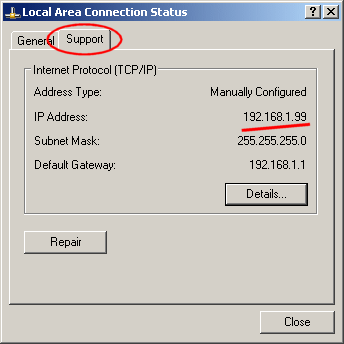
That looks correct. However, please note that the ip address you use has to be your own local ip.

Image


So "192.168.1.181-X" has to be your own "local" address like in the image.
User avatar
monsterman
Member
Posts: 41
Joined: Wed Jun 04, 2008 5:43 pm
Location: Tennessee
Contact:

Post by monsterman »

ok thx phin :D
User avatar
monsterman
Member
Posts: 41
Joined: Wed Jun 04, 2008 5:43 pm
Location: Tennessee
Contact:

Post by monsterman »

Phineus wrote:> i don't know where that screen is

You'll need to find your router's documentation for that.
lol my grandma has her router pw written down that is how i got into mine :D
User avatar
monsterman
Member
Posts: 41
Joined: Wed Jun 04, 2008 5:43 pm
Location: Tennessee
Contact:

Post by monsterman »

I thought i would help out here as well Phin.

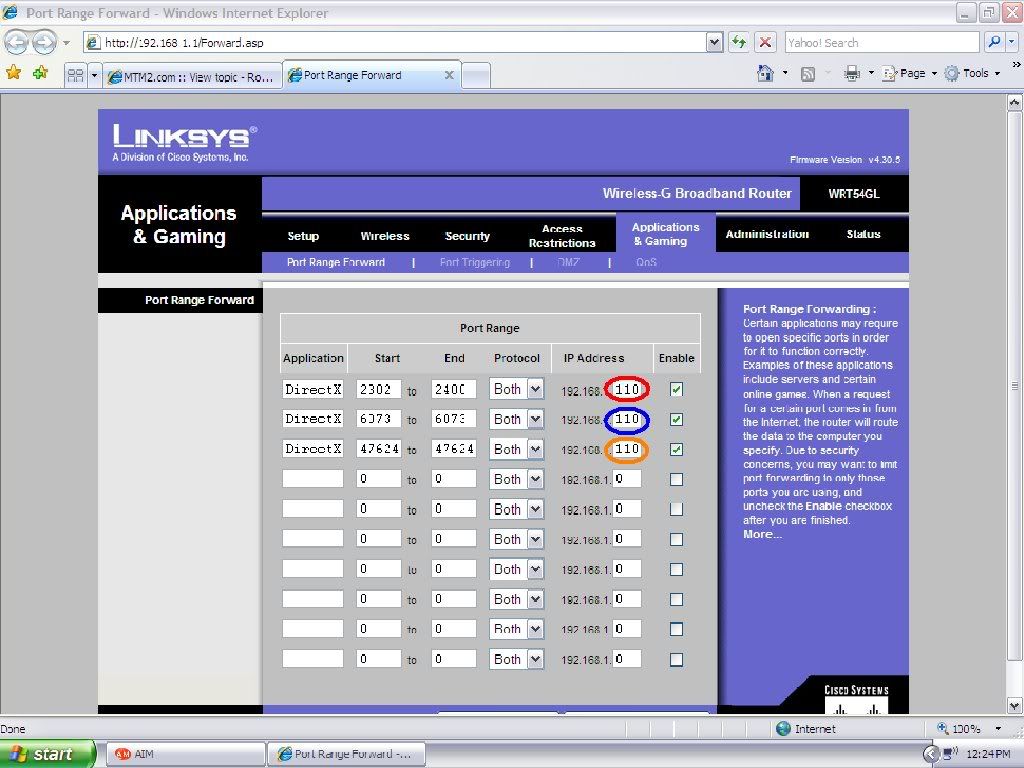
Here is my setup,
Image
as you can see in the default ip address is not right,as you can see below.
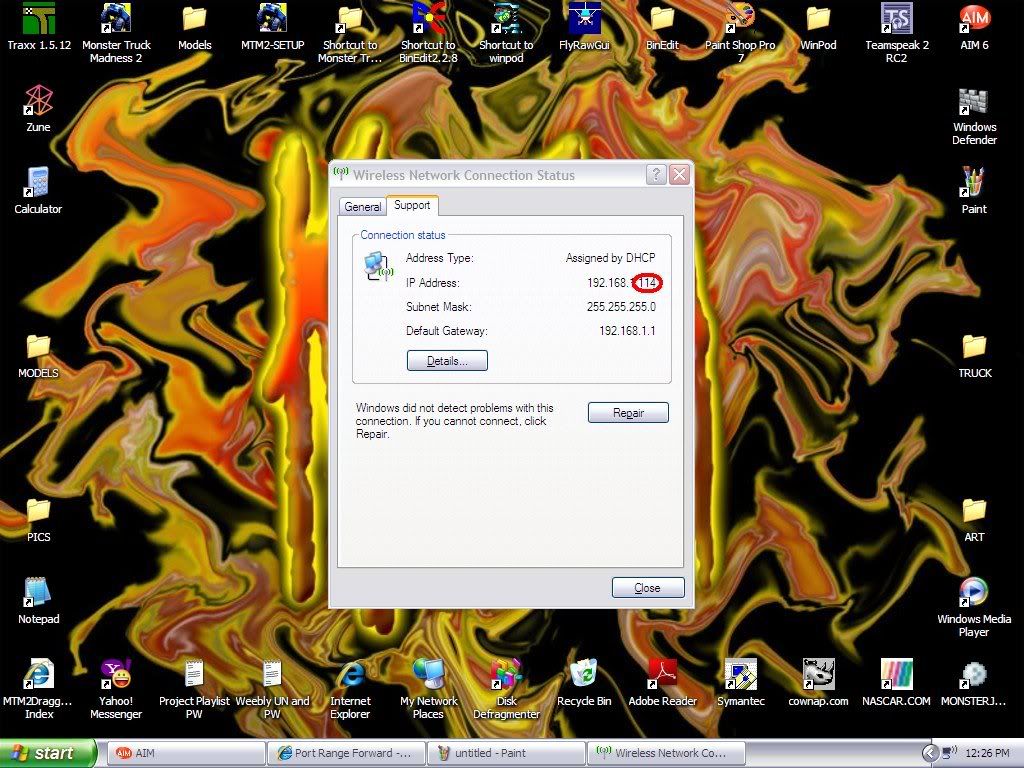
Image
Notice the first seven numbers are the same while the last three are different.


(note)Your default ip changes everyday so you MUST not assume it is the same,to check,double click on your wireless network symbol on your task tray,in my case here,
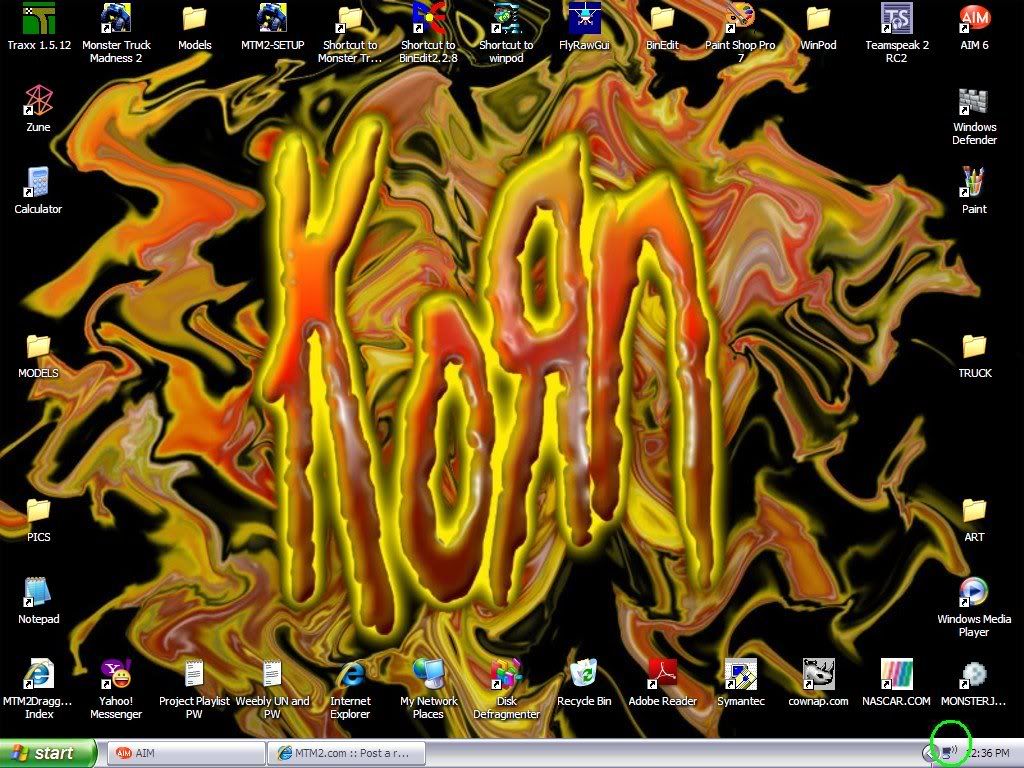
Image
then click on support and find the IP address,finally if it's different change it in your router configuration.
Hope that helped!!!!!! :P
User avatar
Slayer
Member
Posts: 1822
Joined: Sun Oct 16, 2005 4:39 pm
Location: Winnipeg Manitoba, Canada

Post by Slayer »

set your IP address statically, its easier to maintain that way :)
Image
User avatar
monsterman
Member
Posts: 41
Joined: Wed Jun 04, 2008 5:43 pm
Location: Tennessee
Contact:

Post by monsterman »

i have my own way [;)]
Post Reply