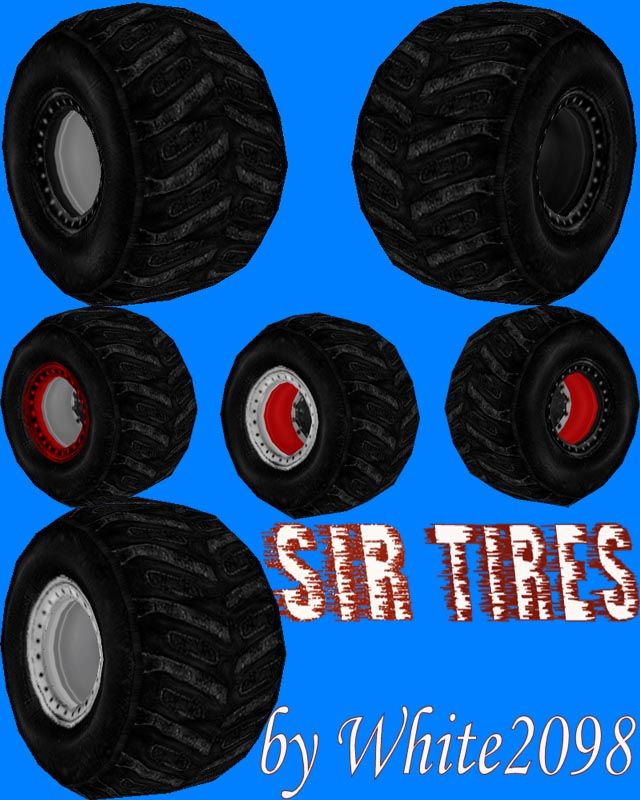
SIR Tires Version 2 by White2098

Downloads: https://www.mtm2.com/~trucks/trucks.php
Post Reply
User avatar
white2098
Member
Posts: 496
Joined: Sun Nov 03, 2002 2:01 pm
Location: carmel, california, usa

SIR Tires Version 2 by White2098

Post by white2098 »

Image
http://mtm2.com/~trucks/dl.cgi?dl=5573

SIR Tires Version 2 by White2098

These are my second attempt at the SIR tires. They are more rounded than before and have new textures.

All credit goes to me, just list my name in your trucks readme file.


Instructions:

The tires base names are listed as,

CIRB2(Black wheels)
CIRR2(Red wheels)
CIRRR(Red beadlocks)
CIRRW(Red beadlocks/White wheels)
CIRV2(Main model)
CIRW2(Main white)

To change any of the tires to black:

Open CIRB216L and replace the texture with any of the following,

CIRTST1
CIRTST2
CIRTST3
CIRTST4
CIRTST5

Then save the tires as a new and unique name so they don't overwrite my tires!

You are more than welcome to modify my tires in any way you need to in order to accommodate your truck,
but please make sure you rename the tire if ANY changes are made!

Enjoy!
User avatar
Roadknight
Member
Posts: 614
Joined: Mon Dec 17, 2007 1:42 pm

Post by Roadknight »

Awesome looking tires White, I haven't tried them on in game yet, but they look superb from the Binedit truck editor.
(These screenshots are Jpegs so they aren't a big file size.)
Image
Image
Image
Image
Image
Image

I am sure these will be as (if not more) popular as the last set you released, they look stunning. I think we should call you the "tire master", White2098. 8)
User avatar
TlathamXmahtalT
Member
Posts: 702
Joined: Sun Jun 08, 2008 7:46 am
Location: In BinEdit, using YOUR models.
Contact:

Post by TlathamXmahtalT »

Why thank you for putting them on two of my trucks, good sir.

White, these are, by far, the greatest tires I have EVER seen come from you. Scratch my comments about the last two sets. THESE are the ones I am going to use from NOW on (Unless, you know, you make an even SICKER set).
User avatar
ShadowPrincess
Gone Walkabout
Posts: 665
Joined: Tue Jan 25, 2005 10:35 am
Contact:

Post by ShadowPrincess »

White these look great, well done :)
User avatar
white2098
Member
Posts: 496
Joined: Sun Nov 03, 2002 2:01 pm
Location: carmel, california, usa

Post by white2098 »

Dang, that's a lot of pictures!

Thanks for the compliments guys/gal! [:-)]
Sewilo
Member
Posts: 89
Joined: Wed Jan 30, 2008 2:38 pm

Post by Sewilo »

Wow, I can't believe how great those look on Mountain Dew, might consider a tire change now :D
User avatar
Roadknight
Member
Posts: 614
Joined: Mon Dec 17, 2007 1:42 pm

Post by Roadknight »

Sewilo wrote:Wow, I can't believe how great those look on Mountain Dew, might consider a tire change now :D
Agree there, these most likely look good on just about anything.
Sewilo
Member
Posts: 89
Joined: Wed Jan 30, 2008 2:38 pm

Post by Sewilo »

They look good, but they make the truck to narrow, so I'll stick with what I got.
User avatar
TlathamXmahtalT
Member
Posts: 702
Joined: Sun Jun 08, 2008 7:46 am
Location: In BinEdit, using YOUR models.
Contact:

Post by TlathamXmahtalT »

Sewilo wrote:They look good, but they make the truck to narrow, so I'll stick with what I got.
Just edit the size of the tire. Click "Model" then "Resize."
User avatar
white2098
Member
Posts: 496
Joined: Sun Nov 03, 2002 2:01 pm
Location: carmel, california, usa

Post by white2098 »

Sewilo wrote:They look good, but they make the truck to narrow, so I'll stick with what I got.
All you have to do is open the truck .trk file and widen the wheel base. I did this so trucks would turn sharper.
Sewilo
Member
Posts: 89
Joined: Wed Jan 30, 2008 2:38 pm

Post by Sewilo »

I did this but there was a seperation from the tires and the truck if I had it to my liking. But I still love the tires ;)
User avatar
JerOutlaw
Member
Posts: 130
Joined: Thu May 31, 2007 12:19 am
Location: 3 hours from Alaska

Post by JerOutlaw »

edit the axle to be bigger then
Image
runt9
Member
Posts: 110
Joined: Wed Apr 17, 2002 2:01 pm

Post by runt9 »

Actually, this was a small mistake on White's part that I found while scoping them out. He didn't center them on the X axis, so therefore, with a basic axle, you don't see the axle connecting with the tire at anytime past about 4.3 on the X axis of the wheelbase. If you center them on the X axis, it puts them in the right position for the truck, and then it doesn't make the truck look weird.
User avatar
white2098
Member
Posts: 496
Joined: Sun Nov 03, 2002 2:01 pm
Location: carmel, california, usa

Post by white2098 »

runt9 wrote:Actually, this was a small mistake on White's part that I found while scoping them out. He didn't center them on the X axis, so therefore, with a basic axle, you don't see the axle connecting with the tire at anytime past about 4.3 on the X axis of the wheelbase. If you center them on the X axis, it puts them in the right position for the truck, and then it doesn't make the truck look weird.
That wasn't a mistake. It's a quick way to make trucks turn and drive sharper. All you have to do is move the wheels inward in the .TRK file until you like where they are. That takes literally 15 seconds tops.
runt9
Member
Posts: 110
Joined: Wed Apr 17, 2002 2:01 pm

Post by runt9 »

White, I've spent more time than just about anyone working on perfecting the handling of trucks. I have to do so to be competitive online. I know you can move the wheels in on the X axis, but for my truck handling, I like my X axis to sit at exactly 4.49. To me, it was a mistake, which obviously it wasn't. I fixed it by centering the tires on the X axis, rather than moving the X axis around on my trucks. Either way, it fixes the issue.

And actually, for those of us that use sponge trucks, moving the tires past about 4.3 on the X axis, especially down to something like 4.2, causes excess body roll and actually makes the suspension stiffer and will even cause the back tire to pop up off the ground when trying to turn, essentially spinning you out. Just one of the many things I've found in my 3 years of modifying handling.

I understand what you were going for, just letting you know it may be an inconvenience to some people who race online and have their setup tuned exactly how they want it. I was just letting them know how to fix it rather than moving the X axis around. Sorry for calling it a mistake.
User avatar
white2098
Member
Posts: 496
Joined: Sun Nov 03, 2002 2:01 pm
Location: carmel, california, usa

Post by white2098 »

Thanks for the clarification Runt. I did that for just a general purpose because a lot of the trucks I tested them on turned very poorly. I figured the easiest way would be to set them off the axis by half a foot and if somebody with a custom setup wanted to change that they could do it. I didn't think it would be that hard to figure out.
Sewilo
Member
Posts: 89
Joined: Wed Jan 30, 2008 2:38 pm

Post by Sewilo »

runt, they are referred as cheat trucks over here. [nyuk]
Post Reply