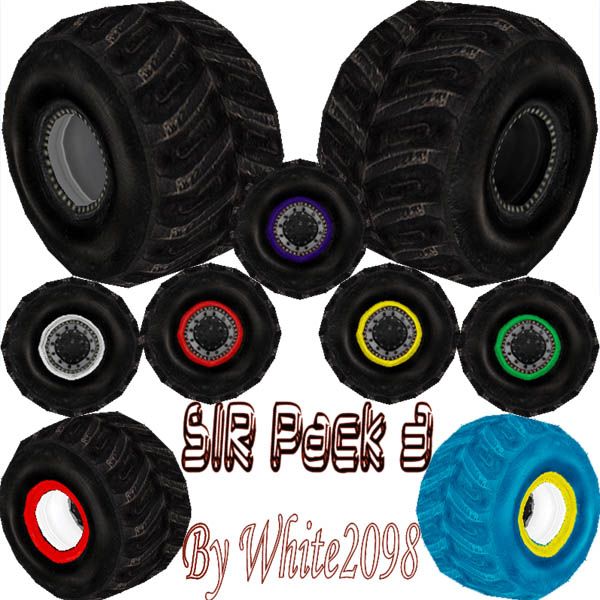
SIR Tire Pack 3 by White2098

Downloads: https://www.mtm2.com/~trucks/trucks.php
User avatar
white2098
Member
Posts: 496
Joined: Sun Nov 03, 2002 2:01 pm
Location: carmel, california, usa

SIR Tire Pack 3 by White2098

Post by white2098 »

Image

http://mtm2.com/~trucks/dl.cgi?dl=5584


These are most likely the final SIR set I will release. I redid the textures shape and size
and added various version of the tire.

Names:

CIRMJ - Main beadlock version
CIMJW - White beadlock version
CIMJR - Red beadlock version
CIMJY - Yellow beadlock version
CIMJG - Green beadlock version
CIMJP - Purple beadlock version
CIXMJ - Black Wheels beadlock version

CISI1 - Blue SIR
CISIB - Black SIR
CISIR - Red SIR
CIXSI - Black Wheels SIR


How to change any tire to Black wheels:

For beadlock version Open CIXMJ and for no beadlocks open CIXSI

Once open, Load the texture of the colored beadlock you want.
Textures:
CIRMJ1 through 7
CIRSI1 through 4

Now replace the texture with the color you want. This part is important...

IF YOU CHANGE THE TIRE IN ANY WAY, SAVE IS UNDER A NEW AND UNIQUE NAME!

That about covers the basics, good luck!

All credit goes to me, White2098.

Enjoy!
User avatar
TlathamXmahtalT
Member
Posts: 702
Joined: Sun Jun 08, 2008 7:46 am
Location: In BinEdit, using YOUR models.
Contact:

Re: SIR Tire Pack 3 by White2098

Post by TlathamXmahtalT »

How many versions are left!? Lol, great job. Like I said before, scratch the last comment. THESE are the tires, unless you make a sicker set, are going to be the ones I will use. :)
MMTManic
Member
Posts: 71
Joined: Thu Feb 05, 2009 6:40 pm
Location: On a boat

Post by MMTManic »

Quick question, how the heck can you change a truck's tires in mtm2 ? :shock:
User avatar
TlathamXmahtalT
Member
Posts: 702
Joined: Sun Jun 08, 2008 7:46 am
Location: In BinEdit, using YOUR models.
Contact:

Post by TlathamXmahtalT »

BinEdit.
User avatar
Roadknight
Member
Posts: 614
Joined: Mon Dec 17, 2007 1:42 pm

Post by Roadknight »

MMTManic wrote:Quick question, how the heck can you change a truck's tires in mtm2 ? :shock:
You can change them in Binedit using the "truck editor" feature.
http://binedit.com/ Get version 2.2 beta.
In the truck editor there is an option to change your wheels.
Image
Just type in the name of the tire series you want to use. E.G. BFC, WHT, and it will automatically change the wheels for you.
User avatar
white2098
Member
Posts: 496
Joined: Sun Nov 03, 2002 2:01 pm
Location: carmel, california, usa

Post by white2098 »

you can also adjust the tire placement below that where it has each tire listed.
MMTManic
Member
Posts: 71
Joined: Thu Feb 05, 2009 6:40 pm
Location: On a boat

Post by MMTManic »

I typed in the name of the tires I wanted to use but they wouldn't come up :?
User avatar
TlathamXmahtalT
Member
Posts: 702
Joined: Sun Jun 08, 2008 7:46 am
Location: In BinEdit, using YOUR models.
Contact:

Post by TlathamXmahtalT »

Click the "..." button and choose the tires then.
MMTManic
Member
Posts: 71
Joined: Thu Feb 05, 2009 6:40 pm
Location: On a boat

Post by MMTManic »

Still doesn't do anything, I keep clicking on the pod of the tires but it still wont come up :x
User avatar
TlathamXmahtalT
Member
Posts: 702
Joined: Sun Jun 08, 2008 7:46 am
Location: In BinEdit, using YOUR models.
Contact:

Post by TlathamXmahtalT »

It's a ".BIN" file. Try again, but this time, make sure all the ".BIN" files are in the "Models" folder and the ".RAW" and ".ACT" files in the "Art" folder.
MMTManic
Member
Posts: 71
Joined: Thu Feb 05, 2009 6:40 pm
Location: On a boat

Post by MMTManic »

Now it says I have no cone or light texture, how do I change that [:-|]
User avatar
TlathamXmahtalT
Member
Posts: 702
Joined: Sun Jun 08, 2008 7:46 am
Location: In BinEdit, using YOUR models.
Contact:

Post by TlathamXmahtalT »

That's because that's for lights. You don't need lights unless you want them.
MMTManic
Member
Posts: 71
Joined: Thu Feb 05, 2009 6:40 pm
Location: On a boat

Post by MMTManic »

Still it won't let me save it :x :x :x
User avatar
TlathamXmahtalT
Member
Posts: 702
Joined: Sun Jun 08, 2008 7:46 am
Location: In BinEdit, using YOUR models.
Contact:

Post by TlathamXmahtalT »

Ok, exit out, and come back in. Don't even touch the arrows that lead to the lights.
User avatar
Kmaster
MTM2 Engineer
Posts: 1370
Joined: Fri Oct 10, 2003 6:19 pm
Location: Valparaíso, Chile.
Contact:

Post by Kmaster »

MMTManic wrote:Quick question, how the heck can you change a truck's tires in mtm2 ? :shock:
Having problems with BinEdit? Well, back in 2003 we changed the tires by just editing the TRK file.

Code: Select all

MTM2 truckName
Your truck
truckModelBaseName
truckmodel
tireModelBaseName
bfc                <---- yes, the tire model base name. 
Nothing fancy. :roll:
User avatar
white2098
Member
Posts: 496
Joined: Sun Nov 03, 2002 2:01 pm
Location: carmel, california, usa

Post by white2098 »

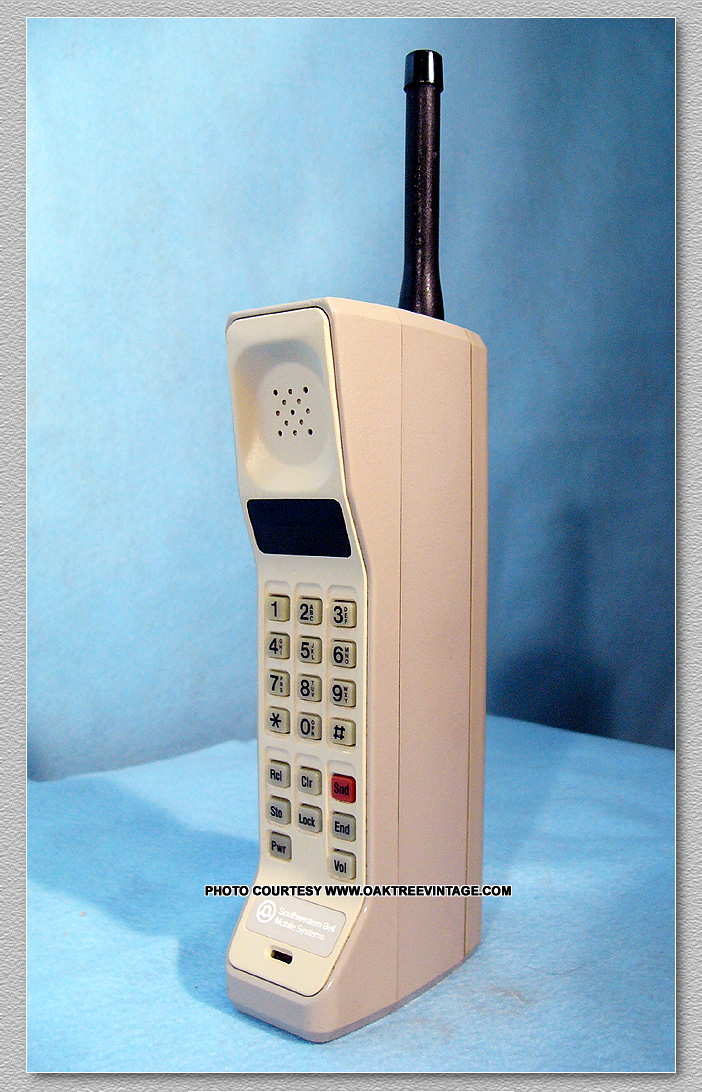
You must still own one of these to

Image
User avatar
TlathamXmahtalT
Member
Posts: 702
Joined: Sun Jun 08, 2008 7:46 am
Location: In BinEdit, using YOUR models.
Contact:

Post by TlathamXmahtalT »

Gonna have to agree with that one. :P
User avatar
OLD_YoMega
Member
Posts: 240
Joined: Fri Jul 06, 2007 2:00 pm

Post by OLD_YoMega »

Why bother with binedit's truck editor? Im used to actually moding the .trk file with wordpad for Evo, yeah, rip open one of those .trks and be lost. Evo rules. ;)
Still around. Somewhere.
User avatar
Kmaster
MTM2 Engineer
Posts: 1370
Joined: Fri Oct 10, 2003 6:19 pm
Location: Valparaíso, Chile.
Contact:

Post by Kmaster »

Hey DynaTAC phones are cool.. and heavy.
white2098 wrote:You must still own one of these to

Image
lol Probably...
MMTManic wrote:Still doesn't do anything, I keep clicking on the pod of the tires but it still wont come up :x
but the big difference: it just works!


so stop wasting your time with the WYSIWYG/GUI/noob stuff and do it the old fashioned way. :wink:
MMTManic
Member
Posts: 71
Joined: Thu Feb 05, 2009 6:40 pm
Location: On a boat

Post by MMTManic »

Sorry, I just didn't know that putting Blue tires on Sudden Impact would be so (bleep) hard, and now it WONT EVEN RUN so screw BinEdit :x
Post Reply