MTM2.com Forum Index MTM2.com
A forum for mtm2 discussion
 
 FAQ :: Search :: Memberlist :: Usergroups :: Register 
 Profile :: Log in to check your private messages :: Log in 

Making custom textures in MS Paint?

 
Post new topic   Reply to topic    MTM2.com Forum Index -> Custom Textures
View previous topic :: View next topic  
Author Message
Destroyerfan
Member


Joined: 24 Apr 2007
Posts: 119
Location: Muskegon, MI

PostPosted: Mon Feb 02, 2009 4:56 pm    Post subject: Making custom textures in MS Paint? Reply with quote

I am currently working on another track, and for any ground textures i need, MS Paint always worked, until now. I need to combine two different textures so i have dirt and concrete in one texture. The problem is when i copy the dirt area that i need and paste it onto the concrete texture it turns the dirt gray, or when i paste the concrete onto the dirt, it turns the dirt brown. The only way it will work is if i save it as 24-bit, but that doesn't work in traxx, so I have to save it as 256 color bitmap and when i do that all the color information is lost. Is there a way that i can put a dirt texture over concrete without the loss of color? Here are some pics to help explain better:
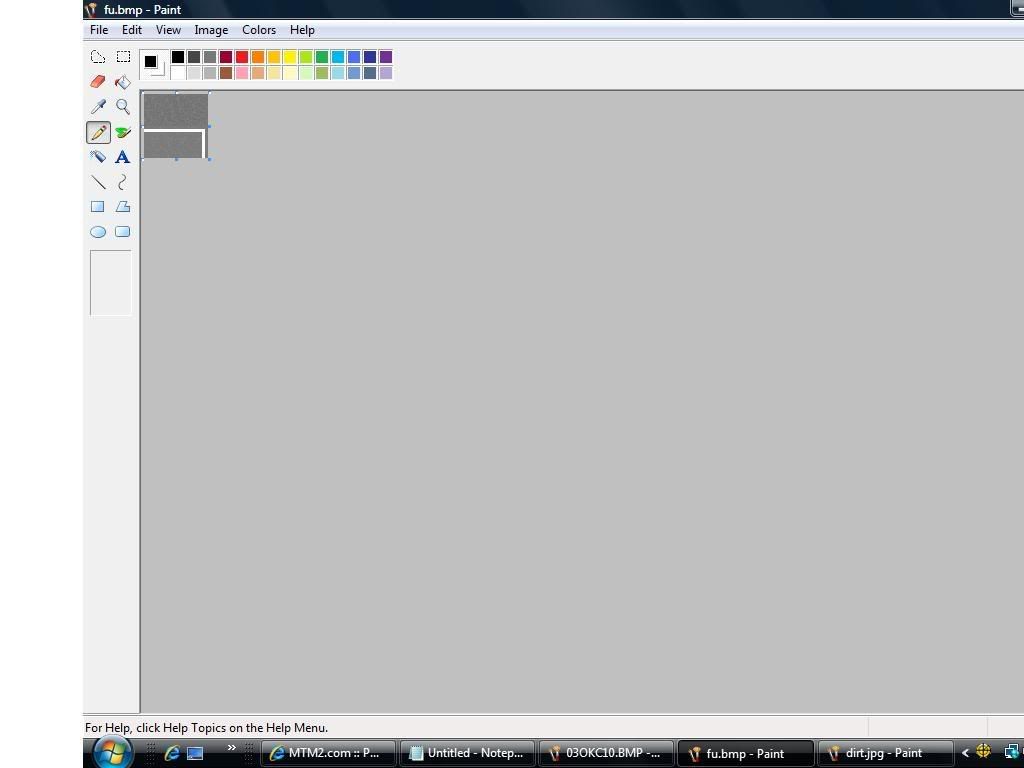
The top half of this texture is the dirt that i pasted, as you can see its the same colors as the concrete.
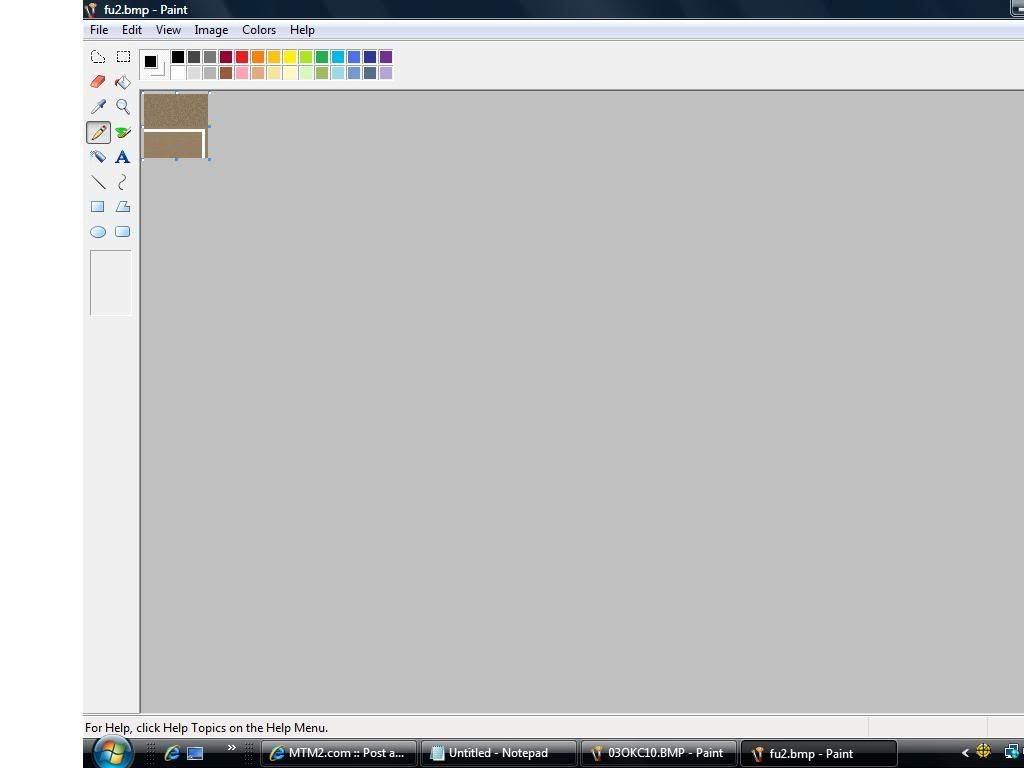
This shows the top half being the concrete that i pasted which turned the same color as the dirt. Hopefully the pics help explain a little better lol. I don't get it, this has worked for me in the past, i've used this method many times but all of a sudden it doesn't anymore. Any suggestions or help would be greatly appreciated. Thanks Smile
_________________
"This is a big toy, thats what we do. Its just parts man. I'm ok, you're ok, the fans are ok, its only parts."- Jim Koehler
Back to top
View user's profile Send private message
Slayer
Member


Joined: 16 Oct 2005
Posts: 1729
Location: Selkirk Manitoba, Canada

PostPosted: Mon Feb 02, 2009 8:18 pm    Post subject: Reply with quote

And on that note, someone post or make a tutorial on how to use Paint to make textures for trucks and tracks.
_________________
Back to top
View user's profile Send private message Visit poster's website AIM Address MSN Messenger
TlathamXmahtalT
Member


Joined: 08 Jun 2008
Posts: 754
Location: In BinEdit, using YOUR models.

PostPosted: Tue Feb 03, 2009 9:16 am    Post subject: Reply with quote

Before you paste, make it 16 million colors instead of 256. Then when you DO paste, make it 256 again.
_________________

Back to top
View user's profile Send private message Send e-mail Visit poster's website AIM Address
Destroyerfan
Member


Joined: 24 Apr 2007
Posts: 119
Location: Muskegon, MI

PostPosted: Tue Feb 03, 2009 3:45 pm    Post subject: Reply with quote

I tried that it turned the cement blue and the dirt pink. Aren't gray, brown and white in the 256 color spectrum?
_________________
"This is a big toy, thats what we do. Its just parts man. I'm ok, you're ok, the fans are ok, its only parts."- Jim Koehler
Back to top
View user's profile Send private message
TlathamXmahtalT
Member


Joined: 08 Jun 2008
Posts: 754
Location: In BinEdit, using YOUR models.

PostPosted: Tue Feb 03, 2009 5:04 pm    Post subject: Reply with quote

AvengerFan wrote:
I tried that it turned the cement blue and the dirt pink. Aren't gray, brown and white in the 256 color spectrum?


It just depends on what colors are in your project. Try making a completely 16 million color texture from scratch, then make it 256.

The spectrum that you're talking about: Whatever colors on your texture are in the 256. Nothing else. If there are only about 100 colors, then the rest of the colors will just be black.
_________________

Back to top
View user's profile Send private message Send e-mail Visit poster's website AIM Address
white2098
Member


Joined: 03 Nov 2002
Posts: 531
Location: carmel, california, usa

PostPosted: Tue Feb 03, 2009 5:05 pm    Post subject: Reply with quote

the 256 colors varies with everything you make if you do it properly. You need to do your work in 16 millions colors and reduce it to 256 before you save it.

A possibility is that the layers are overlapping each other. I'm not sure if MS Paint has layering, but look around and if you do see a layer option make sure that the layers are in the correct order.
Back to top
View user's profile Send private message Send e-mail
Destroyerfan
Member


Joined: 24 Apr 2007
Posts: 119
Location: Muskegon, MI

PostPosted: Wed Feb 04, 2009 11:38 am    Post subject: Reply with quote

How do you reduce it to 256 before you save it? The only way that i knew how to do it before was to save it as 16 million, do the necessary editing and then save it as 256 afterward which is what would mess it up. But if you can convert it before saving, that might be worth a shot (i've tried just about everything else that i can think of lol). I've moved everything around on my track and centered everything up better so i don't necessarily need to make new textures now, but it still would be nice to find a way to do this because as i said its not the first time its happened.
_________________
"This is a big toy, thats what we do. Its just parts man. I'm ok, you're ok, the fans are ok, its only parts."- Jim Koehler
Back to top
View user's profile Send private message
TlathamXmahtalT
Member


Joined: 08 Jun 2008
Posts: 754
Location: In BinEdit, using YOUR models.

PostPosted: Wed Feb 04, 2009 11:46 am    Post subject: Reply with quote

AvengerFan wrote:
How do you reduce it to 256 before you save it? The only way that i knew how to do it before was to save it as 16 million, do the necessary editing and then save it as 256 afterward which is what would mess it up. But if you can convert it before saving, that might be worth a shot (i've tried just about everything else that i can think of lol). I've moved everything around on my track and centered everything up better so i don't necessarily need to make new textures now, but it still would be nice to find a way to do this because as i said its not the first time its happened.


If you have Paint Shop Pro, you can convert to 256 before you save.
_________________

Back to top
View user's profile Send private message Send e-mail Visit poster's website AIM Address
white2098
Member


Joined: 03 Nov 2002
Posts: 531
Location: carmel, california, usa

PostPosted: Wed Feb 04, 2009 1:25 pm    Post subject: Reply with quote

AvengerFan wrote:
How do you reduce it to 256 before you save it? The only way that i knew how to do it before was to save it as 16 million, do the necessary editing and then save it as 256 afterward which is what would mess it up. But if you can convert it before saving, that might be worth a shot (i've tried just about everything else that i can think of lol). I've moved everything around on my track and centered everything up better so i don't necessarily need to make new textures now, but it still would be nice to find a way to do this because as i said its not the first time its happened.


I think you need to just update to a better program. Here's a free download of PSP4,

http://mtm2.com/~mtmg/downloads/misc/paint/psp412.zip

I think MS Paint is just incapable of dealing with anything beyond pencils and paint brushes.
Back to top
View user's profile Send private message Send e-mail
Destroyerfan
Member


Joined: 24 Apr 2007
Posts: 119
Location: Muskegon, MI

PostPosted: Fri Feb 06, 2009 12:20 pm    Post subject: Reply with quote

I must have to create a new folder for it to download into? I downloaded it but when i try to extract it it tells me that the destination folder could not be created.
_________________
"This is a big toy, thats what we do. Its just parts man. I'm ok, you're ok, the fans are ok, its only parts."- Jim Koehler
Back to top
View user's profile Send private message
TlathamXmahtalT
Member


Joined: 08 Jun 2008
Posts: 754
Location: In BinEdit, using YOUR models.

PostPosted: Sat Apr 11, 2009 12:37 pm    Post subject: Reply with quote

Destroyerfan wrote:
I must have to create a new folder for it to download into? I downloaded it but when i try to extract it it tells me that the destination folder could not be created.


Go to www.runt9.com/mtm2tutorials and go to "Truck Making Tutorial."

Download PSP7 from that page.

If your trial runs out, uninstall it, and reinstall it. It just restarts the trial.

All of the functions in the full version are in the trial version, so don't worry about that.
_________________

Back to top
View user's profile Send private message Send e-mail Visit poster's website AIM Address
Display posts from previous:   
Post new topic   Reply to topic    MTM2.com Forum Index -> Custom Textures All times are GMT - 5 Hours
Page 1 of 1

 
Jump to:  
You cannot post new topics in this forum
You cannot reply to topics in this forum
You cannot edit your posts in this forum
You cannot delete your posts in this forum
You cannot vote in polls in this forum


Powered by phpBB © 2001, 2005 phpBB Group