

BinEdit Keeps Crashing When Replacing Textures.

Homepage: http://www.mtm2.com/BinEdit/
Post Reply
User avatar
SparkTB11
Member
Posts: 106
Joined: Sun Feb 05, 2017 5:17 am
Location: Victoria, Australia.

BinEdit Keeps Crashing When Replacing Textures.

Post by SparkTB11 »

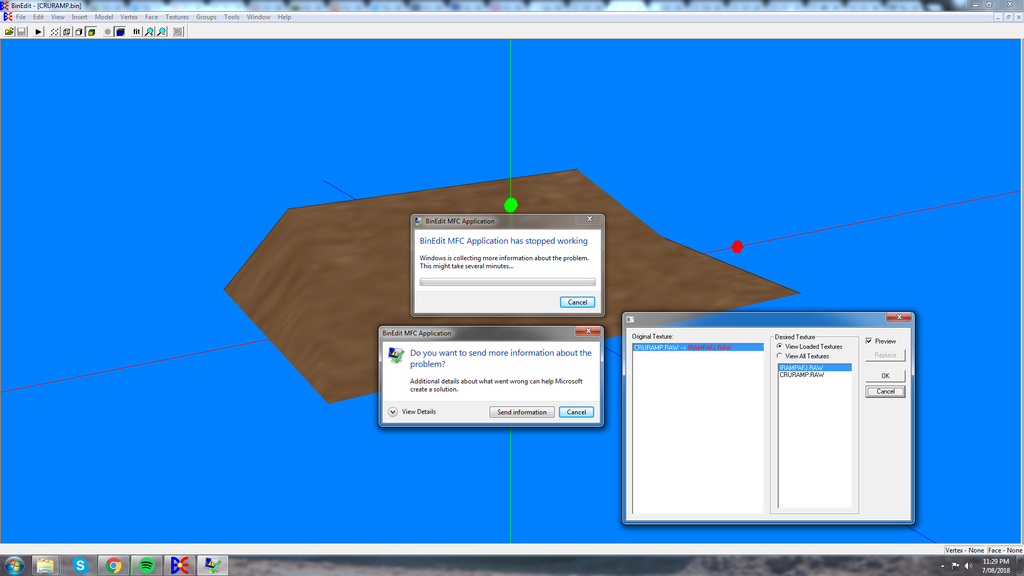
BinEdit won't stop crashing every time I try to replace a texture on a model, and I don't even know why. One thing for sure though is that it's annoying the bloody hell out of me. >:(

Image

Anyone know the reason behind this? I want to start texturing things so badly, but too bad BinEdit keeps crashing every time I do so. >:(

I'm using BinEdit 2.2.8 In case you're wondering.

Jpez1432
Member
Posts: 101
Joined: Sun Apr 17, 2005 8:10 am
Location: U.S.A.
Contact:

Re: BinEdit Keeps Crashing When Replacing Textures.

Post by Jpez1432 »

The only thing that comes to mind would be the size of the textures?

-Jpez1432
-jpez1432@gmail.com
User avatar
NiteMares2k16
Member
Posts: 170
Joined: Fri Jun 03, 2016 9:09 pm

Re: BinEdit Keeps Crashing When Replacing Textures.

Post by NiteMares2k16 »

compatibility mode maybe? and run as admin?
User avatar
SparkTB11
Member
Posts: 106
Joined: Sun Feb 05, 2017 5:17 am
Location: Victoria, Australia.

Re: BinEdit Keeps Crashing When Replacing Textures.

Post by SparkTB11 »

So I've tried doing it with both compatibility mode and run as admin ticked on, and it's still keeps crashing when trying to replace a texture. I'm afraid I can't texture anything without the irritating crashes.
Jpez1432 wrote:The only thing that comes to mind would be the size of the textures?

-Jpez1432
-jpez1432@gmail.com

Both textures are 4.00KB, same thing happens when I try to use textures from other models.
User avatar
SparkTB11
Member
Posts: 106
Joined: Sun Feb 05, 2017 5:17 am
Location: Victoria, Australia.

Re: BinEdit Keeps Crashing When Replacing Textures.

Post by SparkTB11 »

UPDATE.

I've recently tried out a previous version of Binedit, apparently the crashing issue only occurs on Binedit 2.2.8 whereas the previous version doesn't have that issue. In other words, Binedit 2.2.8 for whatever reason doesn't seem to react too kindly when replacing a texture of a model.

At least I can texture things now which is great.
User avatar
Fila
Member
Posts: 1453
Joined: Mon Jul 02, 2001 2:01 pm
Location: Lost in Translation
Contact:

Re: BinEdit Keeps Crashing When Replacing Textures.

Post by Fila »

Gonna give it a try tonight to see if it happens on my end too (and if it does... there's not much I can do about it, lol). Just for the sake of knowing if it's a problem due to a specific computer configuration or a full blown BinEdit bug.
User avatar
BigDOGGe
Member
Posts: 33
Joined: Fri Oct 30, 2009 11:23 am
Location: Silicon Valley

Re: BinEdit Keeps Crashing When Replacing Textures.

Post by BigDOGGe »

SparkTB11 wrote:So I've tried doing it with both compatibility mode and run as admin ticked on, and it's still keeps crashing when trying to replace a texture. I'm afraid I can't texture anything without the irritating crashes.
Jpez1432 wrote:The only thing that comes to mind would be the size of the textures?

-Jpez1432
-jpez1432@gmail.com
Both textures are 4.00KB, same thing happens when I try to use textures from other models.


He may have been speaking along the lines of the pixel height and width of the image....The image size, not it's file size. 256 x 256, 128 x 128, 64 x 64, etc.
Post Reply