
will hurt if..?

will hurt if..?
will it hurt if i leave some banners at 256x256? i know alot set it to 64x64 but when i did that, they were very blurry and couldnt even tell what they said. this is for a replica track btw..they cant be 2 boxes long because i cant fit all the banners to the stadium on the ground boxes..will it hurt if i left them to 256x256? i hate to change them because they look good and clear, but i dunno if it will cause lag..
Monster Trucks are my life, the rest is just details

There is no cut and dried answer. You have to take into consideration what else is in the track. The best advice is to make it the way you want, and then road test it with a couple other people to see how it goes. If you can live with it, keep them in. If it lags too much, then you have to decide what's the most important things to keep in, and what can be taken back out. Sometimes it's a question of trade offs. You know, you can have this but not that, or that but not this. Then you just choose which is most important to you.

You could make a BIN model with the 256x256 texture. Put the 64x64 on the ground box and put the 256 BIN in front of the ground box and set it as "Complex" then people with fast computers with plenty of ram will see it and people with slower computers can set mtm2's graphics options at "Sparse" and will see the lower quality image on the Ground boxes.
To easily make a 2d BIN use txbin:
http://www.mtm2.com/~mtmg/binedit/txbin.html
To easily make a 2d BIN use txbin:
http://www.mtm2.com/~mtmg/binedit/txbin.html
Keep on MTMing,
CH_2005
<a href="http://ch.mtm2.com/">Visit my site</a>
CH_2005
<a href="http://ch.mtm2.com/">Visit my site</a>
-
rocketalces
- Member
- Posts: 205
- Joined: Sun Sep 08, 2002 2:01 pm
- Location: Switzerland
As a rule, MTM2 cannot handle more than 63 textures of size 256x256 at the same time.
Allowing 16 for the trucks (2 per truck, more if you allow custom trucks) plus some for other stuff (sky etc) this leaves you about 42 such textures for the track. (The limit is approximative but works fine).
256x256 textures do not cause lag per se on directX hardware renderers (the MTM2 required graphical memory is ridiculously small compared to actual specs).
The only thing that causes lag is when the texture is loaded into memory (i.e. the first time it is in the visible range). To prevent this, ensure to have all 256x256 textures somewhere in the visible range from the starting position of the trucks. (The explanation about "Texture TV" on the readme of my track CastleNugget could give you some ideas).
Allowing 16 for the trucks (2 per truck, more if you allow custom trucks) plus some for other stuff (sky etc) this leaves you about 42 such textures for the track. (The limit is approximative but works fine).
256x256 textures do not cause lag per se on directX hardware renderers (the MTM2 required graphical memory is ridiculously small compared to actual specs).
The only thing that causes lag is when the texture is loaded into memory (i.e. the first time it is in the visible range). To prevent this, ensure to have all 256x256 textures somewhere in the visible range from the starting position of the trucks. (The explanation about "Texture TV" on the readme of my track CastleNugget could give you some ideas).
ok thanks. well i cant make it where u can see all the textures. what im gonna do is mess around with some and make them not as blurry on 64x64. i counted and got 52 256x256 textures..i took out 2 and just made a hotwheels banner 64x64 and it didnt look to bad. so im just gonna try to get the count down and i should be fine.
Monster Trucks are my life, the rest is just details

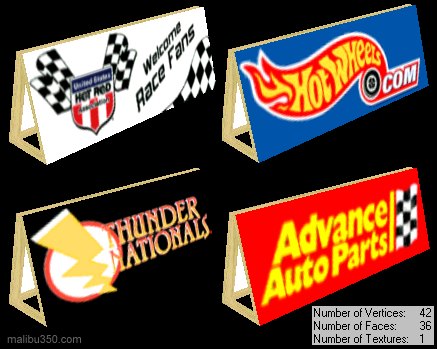
An early draft of a track I made, Momentum X, was a huge lag monster because all the banners in it used one 256x256 texture each. This had to be fixed or the track would be useless, and reducing the texture sizes to 64x64 was out of the question because they looked like crapola. And removing them took too much away from the tracks overall feel. So what I did to fix the problem was to reduce the bin models graphic only slightly so I could fit several banners onto a single 256x256 texture, then with a simple remap in binedit (signs are a very simple remap in binedit and a great way to get started mapping if you've never done so before).
This's an example of what I did for another similar project.
<center>
</center>
UThundernatsigns.zip
In that particular texture above I could have easily fit one more banner by removing the wood area and reducing it and remapping it to a 64x64 since that detail isn't such a big deal.
Good luck with your project and if you have any questions or need a hand with something let us know.
This's an example of what I did for another similar project.
<center>
</center>
UThundernatsigns.zip
In that particular texture above I could have easily fit one more banner by removing the wood area and reducing it and remapping it to a 64x64 since that detail isn't such a big deal.
Good luck with your project and if you have any questions or need a hand with something let us know.

The image above is a jpg image and is the wrong graphic format for binedit to open up a model file (.bin) with.
Download this, UThundernatsigns.zip. Unzip it and put all the 'bin' files in binedit's model folder and the 'raw' and 'act' files in binedit's art folder. Once that's done you can open any of the four bin files with binedit.
Download this, UThundernatsigns.zip. Unzip it and put all the 'bin' files in binedit's model folder and the 'raw' and 'act' files in binedit's art folder. Once that's done you can open any of the four bin files with binedit.