
Binedit error.

Tutorial: www.mtm2.com/~mtmg/repaint/index.shtml
Post Reply
User avatar
Tommy
Member
Posts: 11
Joined: Tue Apr 01, 2008 10:02 pm
Location: San Bernardino, California

Binedit error.

Post by Tommy »

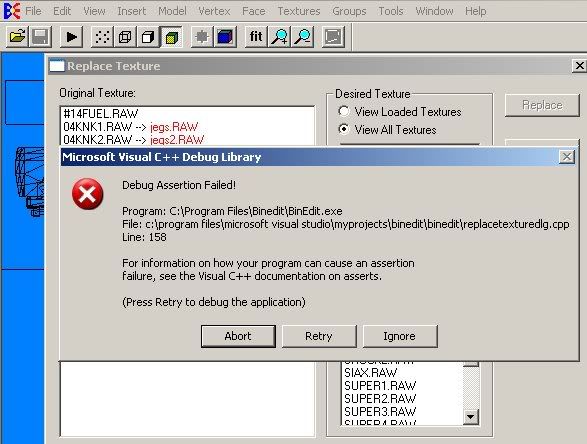
I have an issue. I have recently painted a truck, nothing special but something to start off with and its all done. HOWEVER, when I go to replace it over the King Krunch body like mentioned in Runt's tutorial it gives me this error:

"Error: Unsupported Texture Size!"

Then it gives me this...
Image


Can anyone help me out with this? All my files are 256 x 265 and are RAW files.

Any help will be appreciated,

Thanks,
Tommy
Good Luck to Lindsey Weenk and the Built Ford Tough Blue Thunder in 08-09!
User avatar
monsterman
Member
Posts: 41
Joined: Wed Jun 04, 2008 5:43 pm
Location: Tennessee
Contact:

Post by monsterman »

files need 2 b 256x256 and u have 2 set the preferances
User avatar
Tommy
Member
Posts: 11
Joined: Tue Apr 01, 2008 10:02 pm
Location: San Bernardino, California

Re: Binedit error.

Post by Tommy »

Tommy wrote:
All my files are 256 x 265 and are RAW files.


All my files ARE 256x256.

and..? What about the preferences?
Good Luck to Lindsey Weenk and the Built Ford Tough Blue Thunder in 08-09!
User avatar
Malibu350
easy company
Posts: 2036
Joined: Tue Feb 29, 2000 2:01 pm
Contact:

Post by Malibu350 »

proper color depth 256 8 bit...

Image

Whenever a file's text shows up in red in binedit as in your graphic above it means there's a problem. Usually it's because binedit cannot find it so be sure it's in the correct 'art' folder that binedit looks in (check preferences).

Double check that the raw is in fact 256x256 or 64x64, anything else will not work in mtm even if it's off by one pixel.

Image
Post Reply