Error

mtm2 and other sensible chat
User avatar
AuzGrams
Member
Posts: 57
Joined: Sat Jul 12, 2008 1:11 pm
Location: Heber City, Utah
Contact:

Error

Post by AuzGrams »

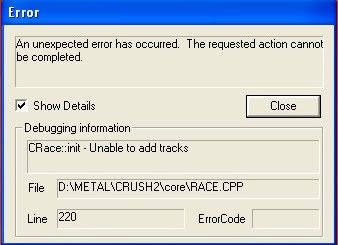
I've currently tried installing the CD Version and Classic-Gaming.net version of MTM2. And I got rid of some of the stock pods that are not needed. Then when I try that out it says.


Image

The same problem for both versions, I do not know whats wrong. I've had the same problem before but can't pinpoint what that was for.
Last edited by AuzGrams on Sun Oct 12, 2008 4:11 pm, edited 1 time in total.
User avatar
Phineus
Glow Ball
Posts: 24
Joined: Tue Feb 02, 1999 7:00 pm

Re: Error! Need Help.

Post by Phineus »

AuzGrams wrote: And I got rid of some of the stock pods that are not needed.

Where'd you ever get an idea like that? Of course the stock pods are needed. Put them back and see if that solves anything.
User avatar
AuzGrams
Member
Posts: 57
Joined: Sat Jul 12, 2008 1:11 pm
Location: Heber City, Utah
Contact:

Re: Error! Need Help.

Post by AuzGrams »

Phineus wrote:
AuzGrams wrote: And I got rid of some of the stock pods that are not needed.

Where'd you ever get an idea like that? Of course the stock pods are needed. Put them back and see if that solves anything.


On Runt9's Tutorial there are only 6 pods that you really need for the game, for example, you don't need Summit1, Summit2, Summit3.

startup.pod
music.pod
sound.pod
truck2.pod
cockpit.pod
ui.pod

These are the only ones you really need for the game. I may be explaining this wrong, but I hope you get the idea. I got the game to work again though. lol [:P]
User avatar
Phineus
Glow Ball
Posts: 24
Joined: Tue Feb 02, 1999 7:00 pm

Re: Error! Need Help.

Post by Phineus »

You're explaining fine. But there is a difference between what is required and what you can get away with under certain conditions.


Phineus wrote: Put them back and see if that solves anything.
User avatar
AuzGrams
Member
Posts: 57
Joined: Sat Jul 12, 2008 1:11 pm
Location: Heber City, Utah
Contact:

Re: Error! Need Help.

Post by AuzGrams »

Phineus wrote:You're explaining fine. But there is a difference between what is required and what you can get away with under certain conditions.


Phineus wrote: Put them back and see if that solves anything.


Yeah, I get you on that. I fixed the problem by adding in a track pod (I'm a dragger) and Fixmore4.pod so I didn't put the regular stock tracks back, I'm still puzzled by the problem though. :?
User avatar
Phineus
Glow Ball
Posts: 24
Joined: Tue Feb 02, 1999 7:00 pm

Post by Phineus »

Which track did you put back in?


[ edit ]

I just tried your short list and the game wouldn't even start.

I compared with cowpod's minimal list and it's the same. The assumption is that you want to run tracks in the game so you'd probably include one.
User avatar
AuzGrams
Member
Posts: 57
Joined: Sat Jul 12, 2008 1:11 pm
Location: Heber City, Utah
Contact:

Post by AuzGrams »

Phineus wrote:Which track did you put back in?


[ edit ]

I just tried your short list and the game wouldn't even start.

I compared with cowpod's minimal list and it's the same. The assumption is that you want to run tracks in the game so you'd probably include one.


Yeah with the list it wouldn't start either, so yeah your right.
User avatar
Slayer
Member
Posts: 1822
Joined: Sun Oct 16, 2005 4:39 pm
Location: Winnipeg Manitoba, Canada

Post by Slayer »

probably a podzipped track or something ruined you
Image
User avatar
OLD_Jammer
Member
Posts: 1582
Joined: Fri Feb 09, 2007 2:04 am
Location: USA
Contact:

Post by OLD_Jammer »

Just leave all the stock pods in, geez.
User avatar
AuzGrams
Member
Posts: 57
Joined: Sat Jul 12, 2008 1:11 pm
Location: Heber City, Utah
Contact:

Post by AuzGrams »

OLD_Jammer wrote:Just leave all the stock pods in, geez.


I would but having less pod's lowers your lag.
User avatar
Phineus
Glow Ball
Posts: 24
Joined: Tue Feb 02, 1999 7:00 pm

Post by Phineus »

Really? How so?
User avatar
Roadknight
Member
Posts: 614
Joined: Mon Dec 17, 2007 1:42 pm

Post by Roadknight »

Phineus wrote:Really? How so?


I would assume because the game has less files to run at a time, so it doesn't have to work as hard.
User avatar
Phineus
Glow Ball
Posts: 24
Joined: Tue Feb 02, 1999 7:00 pm

Post by Phineus »

That's not how the game works.

When the "game" launches, it builds a list of available files from the pods. How do you know? Because if required files are missing you get error messages or the game won't run.

When the "race" launches, it loads the files needed for the track from that list of files.... so in the game, the only files loaded are the ones you need. There are no extras.

So how does having extra pods create lag?
User avatar
AuzGrams
Member
Posts: 57
Joined: Sat Jul 12, 2008 1:11 pm
Location: Heber City, Utah
Contact:

Post by AuzGrams »

Phineus wrote:That's not how the game works.

When the "game" launches, it builds a list of available files from the pods. How do you know? Because if required files are missing you get error messages or the game won't run.

When the "race" launches, it loads the files needed for the track from that list of files.... so in the game, the only files loaded are the ones you need. There are no extras.

So how does having extra pods create lag?


I've always thought and assumed that having extra pods creates more lag when playing in a fun run or something (I'm a dragger), so having less pods definately helps it seems for me.
User avatar
Kmaster
MTM2 Engineer
Posts: 1369
Joined: Fri Oct 10, 2003 6:19 pm
Location: Valparaíso, Chile.
Contact:

Post by Kmaster »

Nope, it doesn't, what creates all the lag is those high vertex trucks and slow connections, but i'm pretty sure you know that.
User avatar
OLD_Jammer
Member
Posts: 1582
Joined: Fri Feb 09, 2007 2:04 am
Location: USA
Contact:

Post by OLD_Jammer »

Yeah, lag is on the connection when OnLine.

MTM2 can run on extremely slow computers with very low graphics capabilities.

For instance, I loaded up the game on a very old and slow work laptop when I went out of town, and I laid down an exact copy of the game directories from my own PC.

All the lists were there, and all the Zoon Packs, Enocell Packs, and a few custom trucks made by OLD_Rockman. The laptop ran the tracks just fine. The laptop internal CPU fan was working louder, as I suspected, but the gameplay was just fine.

Please just leave all the stock pods in the game as intended.
User avatar
Slayer
Member
Posts: 1822
Joined: Sun Oct 16, 2005 4:39 pm
Location: Winnipeg Manitoba, Canada

Post by Slayer »

you can run mtm2 on a 120 mhz machine no problem at all :)
yes we did it at school :)

the time required for the game to compile a list of all the resources for every track is miniscule. We are talking the difference of maybe a single second of initial loading of MTM2, that is from when you dbl click your desktop icon till when the game appears. It has no effect inside the game however. Once the file lists are compiled, its done, it may use more memory but, seriously memory is cheap, this game runs smooth on only 16 megs of RAM :). This game was designed to run on I believe a 48k dial up (correct me if im wrong please).

Even my oldie, with its busted CPU, can load MTM2 with all the tracks and trucks maxed out, in 4 seconds (dbl click time to time I can click driver check in) and thats only a 200 mhz CPU with NO turbo button :p
Image
User avatar
Drive2Survive
Member
Posts: 495
Joined: Fri May 04, 2001 2:01 pm
Location: Bathurst, NSW, Australia
Contact:

Post by Drive2Survive »

Slayer wrote:This game was designed to run on I believe a 48k dial up (correct me if im wrong please).

Try 24kbps. Perhaps even less.

With regards to pods and lag, there's a bit of superstition around it since it's naturally hard to guage what will make the game run better. The only things that "should" have an effect are the actual trucks and track that are loaded when you're playing, but some folks still advise limiting the addons that aren't being used anyway.
10 years of MTM2 ~ 1998-2008
"Thanks for the MTMories"
User avatar
OLD_Fenderbender
Member
Posts: 149
Joined: Sun May 04, 2008 6:54 am
Location: Michigan
Contact:

Post by OLD_Fenderbender »

Slayer wrote:you can run mtm2 on a 120 mhz machine no problem at all :)
yes we did it at school :)

the time required for the game to compile a list of all the resources for every track is miniscule. We are talking the difference of maybe a single second of initial loading of MTM2, that is from when you dbl click your desktop icon till when the game appears. It has no effect inside the game however. Once the file lists are compiled, its done, it may use more memory but, seriously memory is cheap, this game runs smooth on only 16 megs of RAM :). This game was designed to run on I believe a 48k dial up (correct me if im wrong please).

Even my oldie, with its busted CPU, can load MTM2 with all the tracks and trucks maxed out, in 4 seconds (dbl click time to time I can click driver check in) and thats only a 200 mhz CPU with NO turbo button :p


soooo technical lol, all the stock pods have a use in the game missing one might currupt the game itself sometimes, i've had the happen... [(-:]
User avatar
Slayer
Member
Posts: 1822
Joined: Sun Oct 16, 2005 4:39 pm
Location: Winnipeg Manitoba, Canada

Post by Slayer »

wt* you mean techincal, what are you 3 years old :p


Quick fenders running slow, press his turbo button someone :)
Image
Post Reply