CMQ/CMX Tire Pack By White2098

Downloads: www.mtm2.com/MTM2/Trucks/trucks.php
Post Reply
User avatar
white2098
Member
Posts: 496
Joined: Sun Nov 03, 2002 2:01 pm
Location: carmel, california, usa

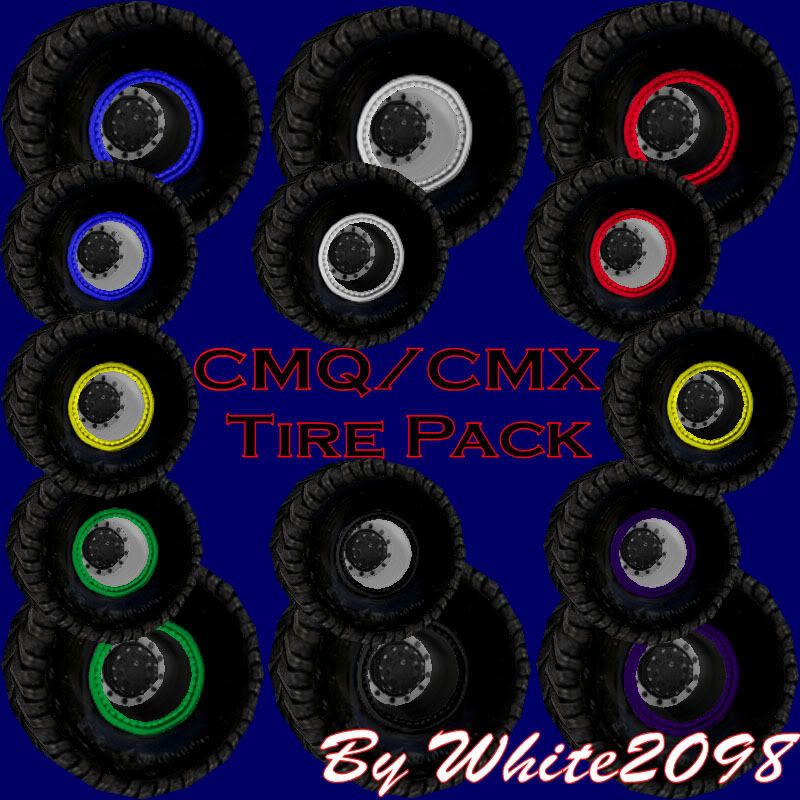
CMQ/CMX Tire Pack By White2098

Post by white2098 »

Image

Readme file,

CMQ/CMX Tires By White2098


Here is my custom tire pack for all MTMers interested in using them.
These tires have a more 3D look to them, 14 versions, and are all
ready to install the second you put them in your MTM2 folders!

These tires use the same texture pallet as my other trucks so if you
want to replace the tread(or anything else) it's as easy and copy and paste.

Instructions:

Unzip the folder and you will see an art and models folder. Open up
the art folder and drag all the files over to the MTM2 art folder. Now
repeat the proccess with the models folder and start using them!

Credits:

These tires were done completly by me. Please just give me proper
credit in your truck credits file.

Enjoy!

http://mtm2.com/~trucks/dl.cgi?dl=5535
Last edited by white2098 on Mon Jan 26, 2009 5:29 pm, edited 1 time in total.
User avatar
TlathamXmahtalT
Member
Posts: 702
Joined: Sun Jun 08, 2008 7:46 am
Location: In BinEdit, using YOUR models.
Contact:

Re: CMQ/CMX Tire Pack By White2098

Post by TlathamXmahtalT »

I'll definitely download this.
User avatar
Destroyerfan
Member
Posts: 115
Joined: Tue Apr 24, 2007 7:58 pm
Location: Muskegon, MI

Post by Destroyerfan »

Dude, i don't know how you do it, but every tire you make is better than the last. These are just awesome man! Even better is you've got just about any truck covered with the different color beadlocks and rims. Just awesome man, great job!
"This is a big toy, thats what we do. Its just parts man. I'm ok, you're ok, the fans are ok, its only parts."- Jim Koehler
User avatar
white2098
Member
Posts: 496
Joined: Sun Nov 03, 2002 2:01 pm
Location: carmel, california, usa

Post by white2098 »

Thanks for the compliments guys :)
User avatar
TlathamXmahtalT
Member
Posts: 702
Joined: Sun Jun 08, 2008 7:46 am
Location: In BinEdit, using YOUR models.
Contact:

Post by TlathamXmahtalT »

white2098 wrote:Thanks for the compliments guys :)


I've already used it on one of my trucks. :)

I have a project I'm working on now, that involves your tires. They're going to be for most of my MJ projects in the future. Thanks dude.
User avatar
white2098
Member
Posts: 496
Joined: Sun Nov 03, 2002 2:01 pm
Location: carmel, california, usa

Post by white2098 »

Yeah, I noticed that on the Destroyer truck, good stuff 8) Good luck on the future work!
User avatar
DAWGFATHER
Member
Posts: 28
Joined: Wed Apr 09, 2008 4:10 pm
Contact:

Post by DAWGFATHER »

anyone mind telling me what i need to use to put these tires on my rides...im not a painter i just wanna update the tires on the trucks for a more...realistic look
User avatar
TlathamXmahtalT
Member
Posts: 702
Joined: Sun Jun 08, 2008 7:46 am
Location: In BinEdit, using YOUR models.
Contact:

Post by TlathamXmahtalT »

DAWGFATHER wrote:anyone mind telling me what i need to use to put these tires on my rides...im not a painter i just wanna update the tires on the trucks for a more...realistic look


Extract the pod in BinEdit

Load up the TRK file in BinEdit

Click the tire base name and press the "..." button

Locate the tire name in the "MODELS" folder

Then double click it

Then click "Make POD"

Then just load it up in MTM2.

If you don't understand this, IDK where to tell you to look.
User avatar
DAWGFATHER
Member
Posts: 28
Joined: Wed Apr 09, 2008 4:10 pm
Contact:

Post by DAWGFATHER »

o.....k
User avatar
Phineus
Glow Ball
Posts: 24
Joined: Tue Feb 02, 1999 7:00 pm

Post by Phineus »

These are just tires? I should look more closely. I bet these would make a good stock upgrade/replacement set.
User avatar
Roadknight
Member
Posts: 614
Joined: Mon Dec 17, 2007 1:42 pm

Post by Roadknight »

Phineus wrote:These are just tires? I should look more closely. I bet these would make a good stock upgrade/replacement set.


Image

Indeed they would, look really nice. I should try them out on all the stocks some time.
User avatar
white2098
Member
Posts: 496
Joined: Sun Nov 03, 2002 2:01 pm
Location: carmel, california, usa

Post by white2098 »

Phineus wrote:These are just tires? I should look more closely. I bet these would make a good stock upgrade/replacement set.


Yes sir, very good idea! The texture is also on one pallet so modifying is very easy.
User avatar
Slayer
Member
Posts: 1822
Joined: Sun Oct 16, 2005 4:39 pm
Location: Winnipeg Manitoba, Canada

Post by Slayer »

they look blocky, did stock tires look that blocky????


Anyways,
Your lack of burning rubber disturbs me
Image
User avatar
white2098
Member
Posts: 496
Joined: Sun Nov 03, 2002 2:01 pm
Location: carmel, california, usa

Post by white2098 »

Slayer wrote:they look blocky, did stock tires look that blocky???


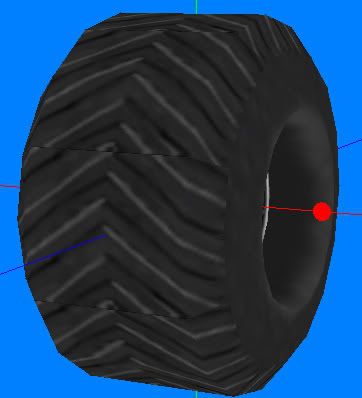
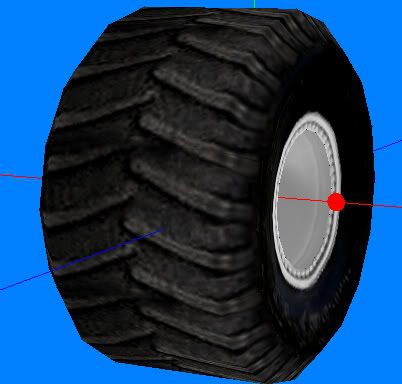
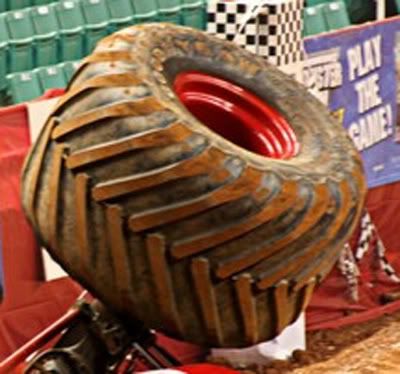
They're shaped differently than the stock tires. They have more texture detail so the modeling had to be changed around to fit the textures.

The real main difference is the sidewalls. The stock tires don't have beadlocks so the sidewalls smother the tire and pop out more. My tires have a lot more detail on the sides and the only way to prevent extra verts was to indent the sidewalls and make up for it by detailed texturing.

MTM2 tire:
Image

CMQ tire:
Image

Real tire:
Image

And as you may have guessed by now MTM2 isn't exactly a model friendly game. Sometimes you have to just take what it gives you.
User avatar
TlathamXmahtalT
Member
Posts: 702
Joined: Sun Jun 08, 2008 7:46 am
Location: In BinEdit, using YOUR models.
Contact:

Post by TlathamXmahtalT »

Roadknight wrote:
Phineus wrote:These are just tires? I should look more closely. I bet these would make a good stock upgrade/replacement set.


Image

Indeed they would, look really nice. I should try them out on all the stocks some time.


I was gonna say the same thing, but I didn't have the time to say it. :P
Post Reply