
MTM2 and Windows Vista
-
SkeletonKing

- Diggerdude
- Posts: 176
- Joined: Sun May 13, 2007 11:32 am
- Location: Behind You
- Contact:
MTM2 and Windows Vista
ever since i got windows vista when i play mtm2 i cant play the game in full screen or the background ends up overlapping the models does anyone know how to fix this?
-
Drive2Survive

- Member
- Posts: 495
- Joined: Fri May 04, 2001 2:01 pm
- Location: Bathurst, NSW, Australia
- Contact:
Sounds like a driver issue. Make sure you've got up to date (Vista-specific) driver files for your graphics adaptor. This is a particular issue with Vista as it is new and doesn't have the driver base built up yet for all the different hardware (I think we're still waiting on final release nVidia drivers).
Alternatively. MTM2's 3D-accelerated graphics only work in fullscreen mode, if you run it in a window it kicks you back to software rendering, which would probably be why it appears to work non-fullscreen to you. You could probably get it to run fullscreen without the background being drawn over objects if you open up the game's display options and set it to use Software rendering, but it may not be as pretty.
Alternatively. MTM2's 3D-accelerated graphics only work in fullscreen mode, if you run it in a window it kicks you back to software rendering, which would probably be why it appears to work non-fullscreen to you. You could probably get it to run fullscreen without the background being drawn over objects if you open up the game's display options and set it to use Software rendering, but it may not be as pretty.
10 years of MTM2 ~ 1998-2008
"Thanks for the MTMories"
"Thanks for the MTMories"
-
SkeletonKing
- Diggerdude
- Posts: 176
- Joined: Sun May 13, 2007 11:32 am
- Location: Behind You
- Contact:

-
SkeletonKing
- Diggerdude
- Posts: 176
- Joined: Sun May 13, 2007 11:32 am
- Location: Behind You
- Contact:
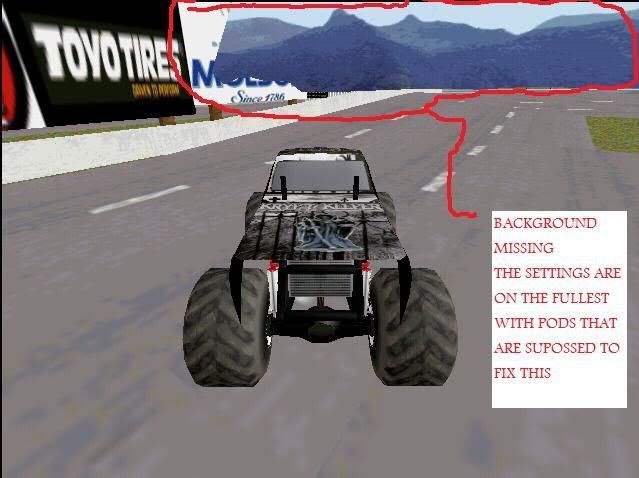

It looks like a driver issue to me as well. I once upgraded my nvidia drivers on windows 98 and had similar display issues as you see, so I had to roll back to the old drivers. When I upgraded to windows XP I dumped nvidia for a radion card and all worked and looked perfect.
There is no fixit pod that deals with graphics hardware issues.
There is no fixit pod that deals with graphics hardware issues.



-
SkeletonKing
- Diggerdude
- Posts: 176
- Joined: Sun May 13, 2007 11:32 am
- Location: Behind You
- Contact:
-
Drive2Survive
- Member
- Posts: 495
- Joined: Fri May 04, 2001 2:01 pm
- Location: Bathurst, NSW, Australia
- Contact:
Well, you can only try it and see what the results are. There's every possibly after rolling back that you'll see a completely different bug, lol.
If it's not right with the latest drivers, roll back. If need be, roll back to the earliest you can (or uninstall the graphics card in Device Manager, reboot and install an old set of drivers), and if it still looks weird then it's time to start testing with incrementally more recent drivers.
If it's not right with the latest drivers, roll back. If need be, roll back to the earliest you can (or uninstall the graphics card in Device Manager, reboot and install an old set of drivers), and if it still looks weird then it's time to start testing with incrementally more recent drivers.
Did you happen to do an upgrade from XP to Vista, or a clean install?Diggerdude wrote:i never had the problem with XP on this comp.
10 years of MTM2 ~ 1998-2008
"Thanks for the MTMories"
"Thanks for the MTMories"
-
SkeletonKing
- Diggerdude
- Posts: 176
- Joined: Sun May 13, 2007 11:32 am
- Location: Behind You
- Contact:
-
Drive2Survive
- Member
- Posts: 495
- Joined: Fri May 04, 2001 2:01 pm
- Location: Bathurst, NSW, Australia
- Contact:
-
SkeletonKing
- Diggerdude
- Posts: 176
- Joined: Sun May 13, 2007 11:32 am
- Location: Behind You
- Contact:

-
Drive2Survive
- Member
- Posts: 495
- Joined: Fri May 04, 2001 2:01 pm
- Location: Bathurst, NSW, Australia
- Contact:
Okay, so you must already be using the earliest version of the drivers Vista has, hence there's nothing to roll back to.
Which is good actually. These probs can be expected with early/old version drivers, which means an update is more likely to fix it. So go to nvidia.com or ati.com (whichever for your graphics card) and update them already.
Which is good actually. These probs can be expected with early/old version drivers, which means an update is more likely to fix it. So go to nvidia.com or ati.com (whichever for your graphics card) and update them already.
10 years of MTM2 ~ 1998-2008
"Thanks for the MTMories"
"Thanks for the MTMories"
-
SkeletonKing
- Diggerdude
- Posts: 176
- Joined: Sun May 13, 2007 11:32 am
- Location: Behind You
- Contact:
 )
)