mtm2 and other sensible chat
max-d freak
Member
Posts: 8 Joined: Fri Nov 06, 2009 9:57 am
Post
by max-d freak Fri Nov 06, 2009 10:04 am
i have a problem when i click on go in the mainscreen this message appears : can't environment map model!.
Roadknight
Member
Posts: 614 Joined: Mon Dec 17, 2007 1:42 pm
Post
by Roadknight Fri Nov 06, 2009 1:49 pm
To get around this problem, go to "options", then "graphics", then click on "hardware options". On this panel, turn off "truck reflections".
max-d freak
Member
Posts: 8 Joined: Fri Nov 06, 2009 9:57 am
Post
by max-d freak Fri Nov 06, 2009 11:14 pm
and what should i do when: Pod.ini doesn't exist. appears in cowpod
Phineus
Glow Ball
Posts: 24 Joined: Tue Feb 02, 1999 7:00 pm
Post
by Phineus Sat Nov 07, 2009 4:59 am
Cowpod will make a new one if it's not there already. Just save, and voila. You can also reset the stock default list using cowpod.
max-d freak
Member
Posts: 8 Joined: Fri Nov 06, 2009 9:57 am
Post
by max-d freak Sat Nov 07, 2009 5:40 am
but how do you do that??
Phineus
Glow Ball
Posts: 24 Joined: Tue Feb 02, 1999 7:00 pm
Post
by Phineus Sat Nov 07, 2009 7:33 pm
max-d freak
Member
Posts: 8 Joined: Fri Nov 06, 2009 9:57 am
Post
by max-d freak Sat Nov 07, 2009 8:42 pm
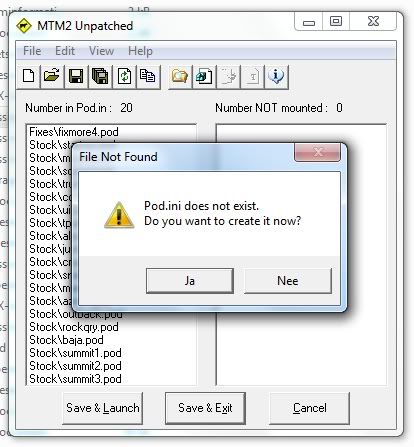
i still have the problem but this is what appears when i click on save & launch :
Phineus
Glow Ball
Posts: 24 Joined: Tue Feb 02, 1999 7:00 pm
Post
by Phineus Sun Nov 08, 2009 5:57 am
It would appear you do not have the proper retail game. No matter, just click yes.
max-d freak
Member
Posts: 8 Joined: Fri Nov 06, 2009 9:57 am
Post
by max-d freak Sun Nov 08, 2009 7:04 am
but it appears any time and i have windows 7.
Phineus
Glow Ball
Posts: 24 Joined: Tue Feb 02, 1999 7:00 pm
Post
by Phineus Sun Nov 08, 2009 7:03 pm
There's your clue then. Look into windows 7 file permissions.
OLD_YoMega
Member
Posts: 240 Joined: Fri Jul 06, 2007 2:00 pm
Post
by OLD_YoMega Sun Nov 08, 2009 8:26 pm
You have to let it have full access to pod.ini and metal.ini in the SYSTEM folder.
Still around. Somewhere.
Kmaster
MTM2 Engineer
Posts: 1371 Joined: Fri Oct 10, 2003 6:19 pmLocation: Valparaíso, Chile.
Contact:
Post
by Kmaster Sun Nov 08, 2009 11:02 pm
OLD_YoMega wrote: You have to let it have full access to pod.ini and metal.ini in the SYSTEM folder.
It's monter.ini, this is not evo
Phineus
Glow Ball
Posts: 24 Joined: Tue Feb 02, 1999 7:00 pm
Post
by Phineus Mon Nov 09, 2009 5:35 pm
OLD_YoMega
Member
Posts: 240 Joined: Fri Jul 06, 2007 2:00 pm
Post
by OLD_YoMega Mon Nov 09, 2009 7:57 pm
Kmaster wrote: OLD_YoMega wrote: You have to let it have full access to pod.ini and metal.ini in the SYSTEM folder.
It's monter.ini, this is not evo
True, but the process is yet the same.
Still around. Somewhere.
max-d freak
Member
Posts: 8 Joined: Fri Nov 06, 2009 9:57 am
Post
by max-d freak Wed Nov 11, 2009 6:09 am
it's all fine now, it was just a setting from the computer to cownap itself